
Struggling to write clean code faster, fix bugs without wasting hours, or understand a large codebase quickly?
You’re not alone and that’s exactly why AI coding tools are becoming a must-have for developers today 🚀.
Tackle Tough Bugs with Claude 🔥
These tools don’t just autocomplete lines; they help you think better, debug smarter, and ship code with confidence.
In this guide, we break down the best AI coding tools that actually make a difference in real development workflows.
We’ve tested them across real use cases, compared their strengths, and highlighted which tools work best for different developer needs.
If you want to code faster, reduce errors, and stay ahead without burning out, you’re in the right place ⚡💻.
📌 What Are AI Coding Tools & Why Developers Are Using Them 🤖💻

AI coding tools are smart assistants that help developers write, understand, and fix code faster. Instead of manually typing everything or searching for solutions, developers get real-time suggestions, error fixes, and logic help directly inside their code editor ⚡.
These tools go beyond simple autocomplete. They understand code context, and some can even analyze your entire project to give relevant suggestions.
Whether you’re writing new code, debugging issues, or refactoring old files, AI coding tools make the process smoother and quicker.
Developers use them because they save time, reduce mistakes, and boost productivity 🚀.
Beginners get guidance, while experienced developers move faster without repeating boring tasks. Simply put, AI coding tools don’t replace developers they help them code smarter 🧠✨.
📌 How We Tested & Selected the Best AI Coding Tools 🧪⚙️
To make sure this list is actually useful, we didn’t rely on marketing claims. Each AI coding tool was evaluated based on real developer workflows and practical use cases 🧠.
Here’s what we focused on:
- Code Accuracy & Relevance – How correct and usable the suggestions are in real projects
- Context Awareness – Whether the tool understands just one file or the full codebase
- IDE Integration – Smooth support for editors like VS Code or JetBrains
- Debugging & Refactoring Help – How well it helps fix errors and improve existing code
- Security & Privacy – Especially important for professional and enterprise use
- Ease of Use – Simple setup, clean UI, and minimal learning curve ⚡
Only tools that performed consistently well across these points made it to this list 🚀.

Transform Ideas into Code with Gemini ✨
📌 Best AI Coding Tools for Developers (In-Depth Reviews) 🧠🚀
Now comes the most important part the actual AI coding tools that developers are using to write better code, debug faster, and handle complex projects with less effort. Instead of listing random tools, we’ve picked only the most reliable and widely used AI coding assistants that deliver real value in day-to-day development work.
Each tool below is reviewed based on real use cases, not just features. You’ll see what it’s best at, where it performs better than others, and which type of developer should use it.
Whether you’re a beginner, a full-stack developer, or working on large codebases, this section will help you choose the right AI coding tool with confidence ⚡💻.
⬇️ Let’s start with the first tool.
1️⃣ GitHub Copilot – Best AI Pair Programmer for Real-Time Code Writing 🤖⚡
GitHub Copilot is an AI-powered coding assistant that works directly inside your IDE to suggest code in real time. It’s designed for developers who write code daily and want to move faster without compromising quality, especially in modern frameworks and languages.

🔹 Key Features
1. Context-aware suggestions
Copilot reads your current file, comments, and nearby code to suggest relevant lines, functions, or logic instead of random snippets.
2. IDE support
Works smoothly inside popular editors like VS Code and JetBrains, so there’s no need to switch tools or learn a new interface.
3. Multi-language coverage
Supports major languages like JavaScript, Python, Java, TypeScript, Go, and more useful for full-stack developers.
4. Security & privacy controls
Includes options to reduce risky code patterns and manage how suggestions are generated, important for professional projects.
👉 In short, Copilot is about speed and convenience while writing code.
🔹 How It Works in Real Development
- When writing code:
Copilot autocompletes full lines, functions, and logic blocks as you type, reducing repetitive work and speeding up development ⚡ - While debugging:
It helps suggest fixes, alternative logic, or cleaner implementations when you’re stuck on errors or unexpected behavior - While refactoring:
Copilot assists in rewriting messy or outdated code into cleaner, more readable versions without breaking functionality - During large codebase edits:
It recognizes existing patterns and conventions, helping you maintain consistency across files and modules 🧠
🔹 Pros & Cons
Pros:
- Massive productivity boost
- Excellent IDE integration
- Strong support for modern languages and frameworks
Cons:
- Suggestions still need human review
- Less effective without clear context or comments
🔹 Best For (Clear Verdict)
Best for full-time developers using VS Code or JetBrains who want faster coding and reduced repetitive work in active projects 🚀
Boost Your Coding Speed with Copilot 🚀
2️⃣ Cursor – Best AI Code Editor for Full Codebase Understanding 🧠⚡
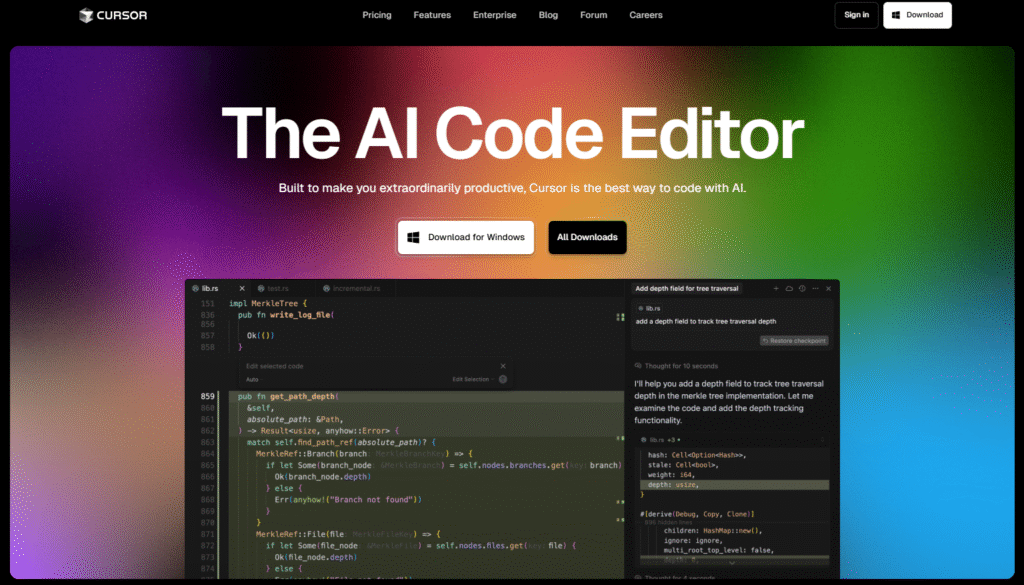
Cursor is an AI-first code editor built on VS Code that’s designed for developers working with large or complex projects. It’s ideal for those who want AI that understands their entire repository, not just the current file.
🔹 Key Features
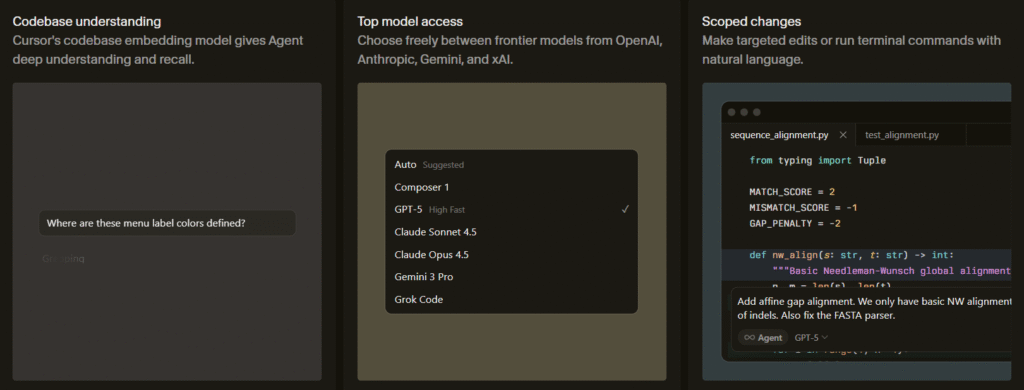
1. Full codebase awareness
Cursor can analyze multiple files and folders together, which helps it give more accurate suggestions and safer changes.
2. Built-in AI editor (VS Code based)
It feels like VS Code but comes with AI deeply integrated, not just as a plugin.
3. Advanced debugging & refactoring
You can ask Cursor to explain errors, refactor code, or update logic across files saving hours on manual work.
4. Privacy-conscious options
Offers more control over how your code is processed, which is useful for teams handling sensitive projects.
👉 Cursor focuses on deep understanding and large-scale code changes, not just fast typing.
🔹 How It Works in Real Development
- When writing code:
Cursor generates code using awareness of existing functions, imports, and patterns across your project, reducing mismatches and rework ⚡ - While debugging:
You can ask Cursor questions about errors, stack traces, or logic, and it responds with context-aware fixes based on your codebase - While refactoring:
It safely updates multiple related files, helping rename variables, restructure logic, or modernize patterns without breaking dependencies - During large codebase edits:
Cursor shines here its repo-level understanding makes bulk changes faster and more accurate 🧠
🔹 Pros & Cons
Pros:
- Excellent full-project awareness
- Strong debugging and refactoring help
- Familiar VS Code feel with AI built in
Cons:
- Requires editor switch (from stock VS Code)
- Can feel heavy for very small projects
🔹 Best For (Clear Verdict)
Best for developers working on large codebases who need AI that understands the whole project not just single files 🚀
Unlock Full Codebase Power Now ⚡
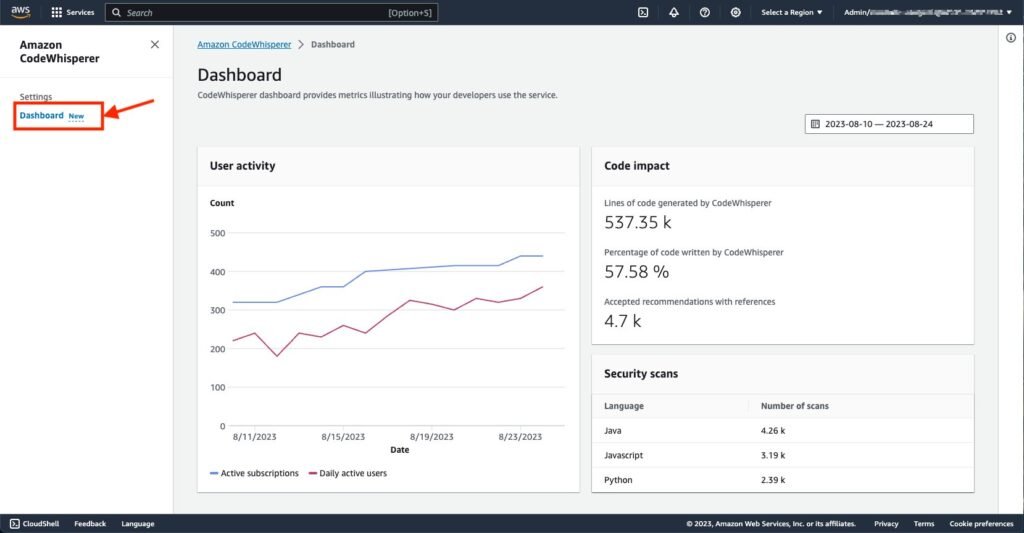
3️⃣ Amazon CodeWhisperer – Best AI Coding Tool for AWS Developers ☁️🤖
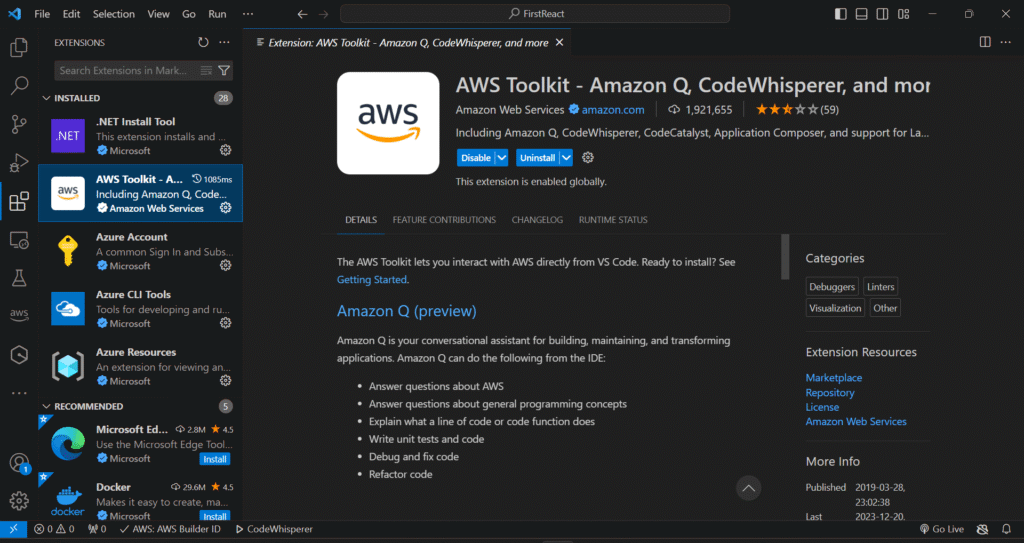
Amazon CodeWhisperer is an AI-powered coding assistant built mainly for developers working inside the AWS ecosystem. It helps generate secure, high-quality code suggestions directly in your IDE and is especially useful for cloud, backend, and infrastructure-related development.
🔹 Key Features
1. Context-aware code suggestions
CodeWhisperer analyzes your current code, comments, and surrounding logic to suggest relevant snippets, especially for AWS services like S3, Lambda, DynamoDB, and IAM.
2. Strong IDE support
It integrates smoothly with editors like VS Code, JetBrains, and AWS Cloud9, allowing developers to stay inside their usual workflow without switching tools.
3. Focused language coverage
Supports popular backend and cloud languages such as Python, Java, JavaScript, and TypeScript, making it ideal for server-side and cloud-native projects.
4. Built-in security scanning
One of its biggest strengths CodeWhisperer automatically checks suggestions for security issues like hardcoded credentials, insecure configurations, and vulnerable patterns 🔐.
5. AWS-optimized suggestions
Unlike general AI tools, it is trained specifically to generate AWS best-practice code, which reduces misconfigurations in production environments.
🔹 How It Works in Real Development
- When writing code:
As you write cloud-related logic, CodeWhisperer suggests ready-to-use AWS SDK calls and infrastructure code, reducing manual documentation checks ⚡ - While debugging:
It helps spot misused AWS APIs or insecure patterns that could cause runtime or permission errors. - While refactoring:
Assists in cleaning up cloud logic and updating old AWS code to follow modern best practices. - During large codebase edits:
It maintains consistency in AWS-related implementations across files, which is crucial in enterprise cloud projects ☁️🧠
🔹 Pros & Cons
Pros:
- Excellent for AWS-focused development
- Strong security and compliance checks
- Free tier available for individual developers
Cons:
- Less useful outside AWS ecosystem
- Not ideal for frontend-heavy projects
🔹 Best For (Clear Verdict)
Best for backend and cloud developers working heavily with AWS services who want secure, production-ready code faster 🚀
Supercharge Your AWS Code Today ☁️
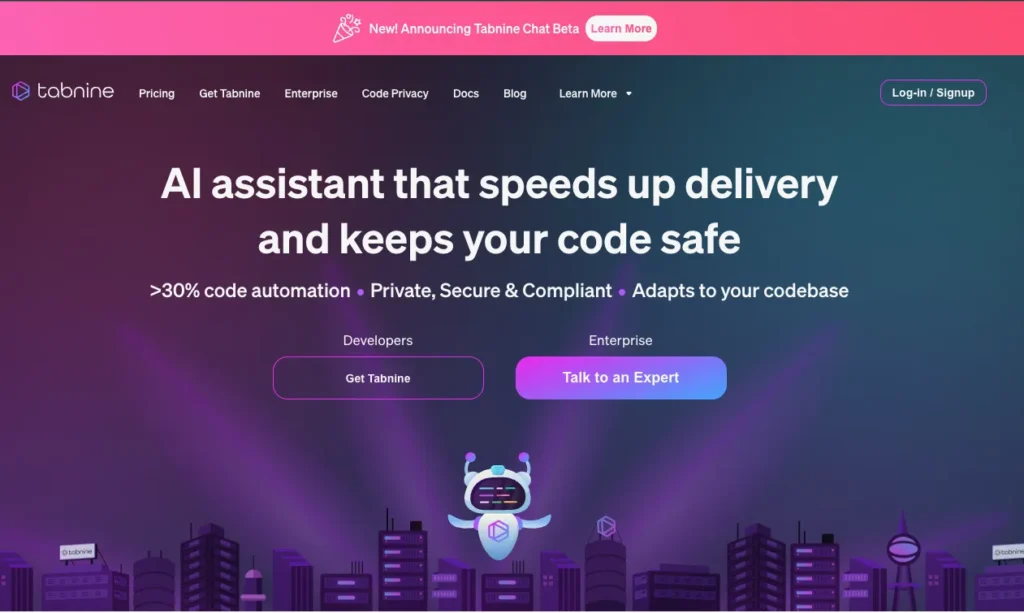
4️⃣ Tabnine – Best AI Coding Assistant for Privacy & Enterprise Teams 🔐💼
Tabnine is an AI coding assistant built with a strong focus on privacy, security, and enterprise control. It’s ideal for teams and organizations that want AI-powered code suggestions without exposing sensitive code or relying heavily on public cloud models.
🔹 Key Features
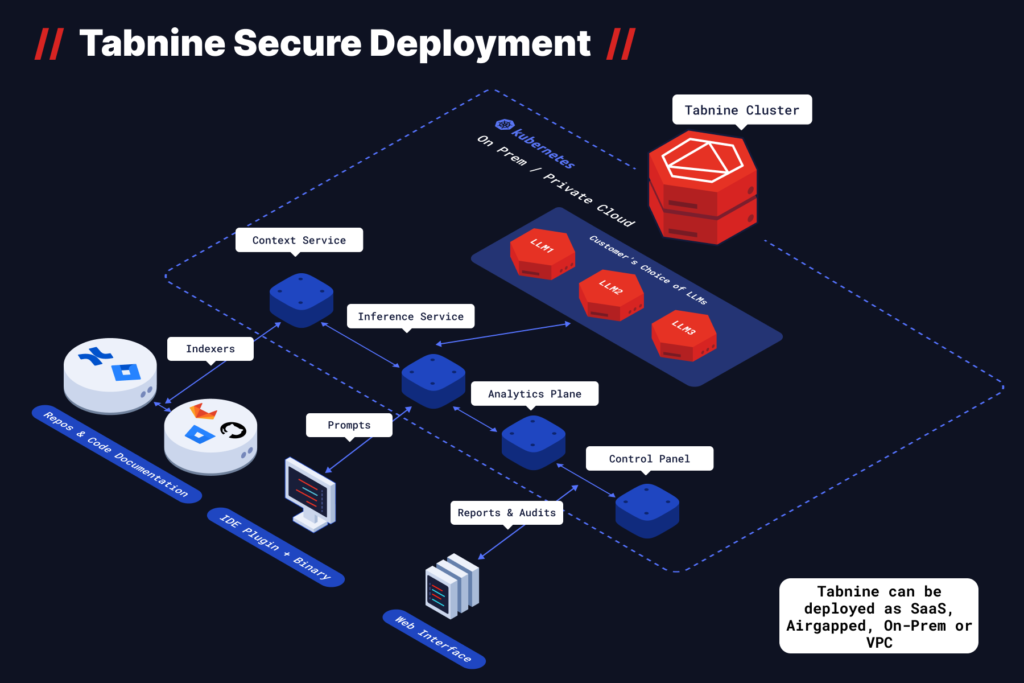
1. Privacy-first architecture
Tabnine can run in local, private cloud, or on-premise environments, ensuring your source code isn’t sent to public servers critical for regulated industries.
2. Context-aware code completion
It learns from your codebase and coding style to provide relevant suggestions that match existing patterns, reducing inconsistent code.
3. Broad IDE support
Works seamlessly with VS Code, JetBrains, Eclipse, Visual Studio, and more making it easy to deploy across large teams.
4. Wide language coverage
Supports popular languages like Java, Python, JavaScript, C/C++, Go, PHP, and others useful for enterprise stacks with mixed tech.
5. Team & policy controls
Admin-level controls allow organizations to manage models, permissions, and compliance requirements at scale 🧠
🔹 How It Works in Real Development
- When writing code:
Tabnine offers inline suggestions that align with your project’s style, helping developers write consistent code faster ⚡ - While debugging:
It suggests safer alternatives and cleaner implementations when errors appear or logic feels off. - While refactoring:
Helps modernize old code by suggesting improved patterns without changing business logic. - During large codebase edits:
Because it learns from internal repositories, Tabnine maintains consistency across files ideal for long-term enterprise projects 🏗️
🔹 Pros & Cons
Pros:
- Strong privacy and security focus
- Enterprise-friendly deployment options
- Consistent suggestions across teams
Cons:
- Less “creative” than LLM-based tools
- Advanced features may require paid plans
🔹 Best For (Clear Verdict)
Best for enterprise teams and privacy-conscious developers who need secure AI code completion without sharing source code externally 🔐🚀
Keep Your Code Secure with Tabnine 🔐
5️⃣ ChatGPT / Claude / Gemini – Best AI Coding Tools for Logic & Debugging 🧠💻
ChatGPT, Claude, and Gemini are large language models (LLMs) that go beyond simple code completion. They excel in complex tasks, from debugging tricky code to brainstorming new features, all while allowing natural language-to-code translation. These models are perfect for developers who need problem-solving assistance or when you get stuck with complex logic.
🔹 Key Features
1. Natural language-to-code generation
Simply describe what you need, and these models can generate entire code blocks, making them powerful for brainstorming and tackling difficult tasks 📝
2. Complex debugging
They analyze existing code and provide detailed explanations and possible fixes for bugs, logical errors, or inefficient code.
3. Cross-discipline code suggestions
They’re not just for one language whether it’s Python, JavaScript, or even SQL, these models adapt to many coding tasks and programming languages 🔄
4. Access to cutting-edge AI models
The strength of ChatGPT, Claude, and Gemini lies in their powerful neural networks, trained on vast amounts of data. This allows them to give insights that typical code-completion tools can’t offer.
5. Cloud integration for team workflows
These models can be integrated into cloud platforms like OpenAI API, allowing teams to leverage their capabilities in collaborative settings 🌐
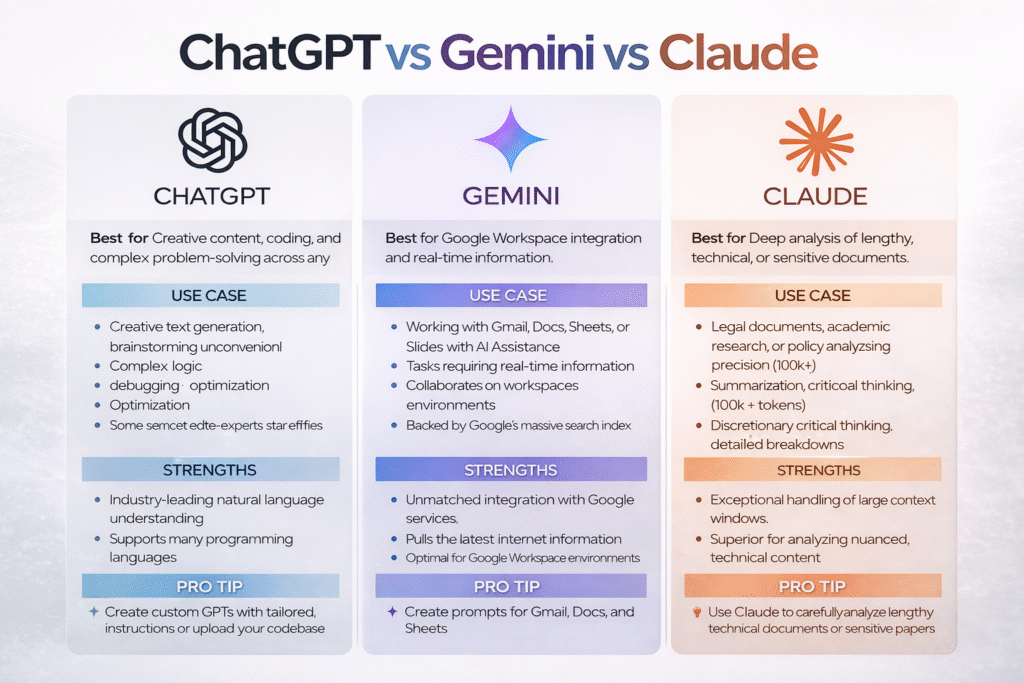
🔹 How It Works in Real Development
- When writing code:
You can ask them to generate code snippets based on natural language instructions, helping you get through complex features or API calls quickly ⚡ - While debugging:
These models analyze your code, spot errors or inefficiencies, and suggest improvements in real time, reducing trial-and-error debugging. - While refactoring:
They offer alternative logic and cleaner versions of your code, providing better practices and modern solutions. - During large codebase edits:
They help spot large-scale structural issues, suggest optimizations, and provide insights into maintaining readability across the entire project 🧠
🔹 Pros & Cons
Pros:
- Great for logic-heavy coding tasks
- Can help with large-scale problem-solving and debugging
- No need for specific syntax knowledge, as you can explain in natural language
Cons:
- Sometimes provide overly generic suggestions
- May not be as fine-tuned for everyday, repetitive coding tasks as specialized tools
🔹 Best For (Clear Verdict)
Best for developers looking for help with complex logic, debugging, or when working with large codebases that require brainstorming and natural language translation 🌟
Unlock Logic-Solving Power with ChatGPT 🤖
“To dive deeper into the specifics of using GitHub AI models and automating tasks with the AI Toolkit for VS Code, we recommend this visual guide on AI Automation for a comprehensive breakdown.”
📌 AI Coding Tools Comparison Table 🧠⚡
Here’s a comparison table to clearly highlight the key features of each AI coding tool, helping users make an informed choice quickly.
| Tool | Best For | Context Awareness | ID Support | Language Coverage | Privacy Focus |
|---|---|---|---|---|---|
| ChatGPT | General coding assistance | Yes | Web, VS Code plugins | All major languages | Medium (OpenAI policies) |
| Claude | Complex reasoning & code logic | Yes (excellent) | Web, API integrations | All languages | High privacy focus |
| Gemini | Google ecosystem & fast responses | Yes | VS Code, Android Studio | JavaScript, Python, Java | Google enterprise security |
| GitHub Copilot | Real time writing & full project codebase | Yes | VS Code | JavaScript, Python, Go | Security with privacy controls |
| Cursor | Full project development | Yes | VS Code | JavaScript, React, Node.js | High |
| Amazon CodeWhisperer | Enterprise teams & privacy | Yes | VS Code, JetBrains | Java, C++, TypeScript | Strong AWS security |
| Tabnine | Teams & cloud debugging | Yes | Web, Eclipse | Multiple languages | Good privacy controls |
| Cody / Sourcegraph | Code logic & learning | Yes | API Interface | Including Python, JS | Medium usage security |
📌 Are AI Coding Tools Safe? Security & Privacy Explained 🔐💻
When it comes to AI coding tools, security and privacy are paramount. Since these tools work directly with your codebase, there are important factors to consider before integrating them into your workflow.
🔹Security Concerns
1. Code Privacy:
Some AI tools, like Tabnine, offer local or on-premise deployment, ensuring no data is sent to the cloud. However, tools like GitHub Copilot or ChatGPT may send code to external servers for processing, raising concerns in industries with strict compliance requirements. It’s crucial to check the data policies of any AI tool you choose.
2. Code Vulnerabilities:
Tools like Amazon CodeWhisperer automatically scan for common security vulnerabilities in your code (e.g., insecure API calls, improper authentication) to ensure that the suggestions you receive are secure. This is particularly useful for cloud-based projects and enterprise-level applications.

3. Access Control:
For teams, many tools like Tabnine and Cursor provide admin-level control over who can access and use the AI assistant. This is important for controlling sensitive code and maintaining company security.
📌 Free vs Paid AI Coding Tools – Which One Is Worth It? 💰⚙️
| Aspect | Free AI Coding Tools 🆓 | Paid AI Coding Tools 💎 |
|---|---|---|
| Aspect |
Many AI coding tools offer free versions with limited features, suitable for personal projects or learning purposes. Here’s what you can expect:
|
Paid plans for tools like GitHub Copilot, Tabnine, and Cursor come with premium features:
|
| Features |
|
|
| Example |
Example:
ChatGPT and Claude offer free access through limited API usage or web interfaces but have usage caps that may not meet the demands of a full-time developer.
|
Example:
GitHub Copilot’s Pro version offers priority access to advanced features, including team-based code collaboration and higher security compliance, which can be essential for professional developers.
|
Which One is Worth It?
- For Individual Developers: Free tools like ChatGPT or Tabnine (Free) are often sufficient for small projects or learning.
- For Enterprises or Professional Teams: Paid tools like GitHub Copilot Pro or Tabnine Enterprise are worth the investment, especially when security and collaborative features matter.
📌 Which AI Coding Tool Should You Choose?🤔💡
Choosing the right AI coding tool depends on your development needs, security requirements, and team size. Here’s a breakdown of who should choose which tool:

1️⃣ GitHub Copilot – Best for individual developers or small teams who want to write code faster with minimal setup. Ideal for those already using VS Code and looking for real-time suggestions.
2️⃣ Cursor – Best for larger projects and teams that need an AI assistant to understand an entire codebase. Perfect for developers who want context-aware suggestions and are working with complex projects.
3️⃣ Amazon CodeWhisperer – Best for AWS developers or those working on cloud-native projects. Offers secure suggestions for cloud services like Lambda and DynamoDB, making it a perfect choice for backend development.
4️⃣ Tabnine – Best for enterprise teams that need an AI assistant but with strict privacy and security controls. It’s ideal for larger organizations needing a self-hosted option to ensure data security.
5️⃣ ChatGPT / Claude / Gemini – Best for debugging and complex problem-solving tasks, or when you need an AI assistant that can help with natural language-to-code translation. Suitable for freelancers or part-time developers looking to streamline their workflow.
“RELATED ARTICLES”
5+ Best Free AI Tools: That Replace Paid AI (Tested)
5+ Best Canva Alternatives Designers Prefer
FAQs 🤖❓
1. How do AI coding tools improve developer productivity?
AI tools speed up coding, automate repetitive tasks, suggest error fixes, and generate relevant code snippets based on context, reducing manual work and boosting efficiency.
2. Can AI coding tools work offline?
Yes, Tabnine and other privacy-focused tools offer offline support, allowing you to use them without internet access, ensuring your code stays private.
3. Do AI coding tools require setup or training?
Most AI coding tools, like GitHub Copilot, are plug-and-play. However, some, like Cursor, require minimal setup for full codebase understanding.
4. Are AI coding tools suitable for beginners?
Yes, AI coding tools like ChatGPT can assist beginners by providing explanations, suggestions, and learning resources to improve coding skills and reduce errors.
5. Do AI coding tools integrate with all IDEs?
Most tools integrate with popular IDEs like VS Code, JetBrains, and Eclipse, but you should verify compatibility with your preferred development environment.