
Want to create stunning videos effortlessly?
🎥 AI video generators make video production quick and easy by automating everything from editing to rendering.
🚀 Start Creating with Runway AI – Free Trial!
These tools are designed for creators, marketers, and educators who want to produce high-quality videos without complex software or editing skills. ⚡
In this article, we’ll explore the 5+ Best AI Video Generators of 2025, so you can find the perfect tool for your needs. 🚀 Ready to level up your video content? Let’s get started!
📌 Why Use an AI Video Generator?
AI video generators are transforming how we create video content. Here’s why you should consider using one for your next project:

- Time-Saving ⏳: Traditional video editing can be time-consuming, requiring hours to produce a polished video. AI video generators automate many of the tedious steps, speeding up the process and allowing you to focus on creativity.
- Cost-Effective 💰: Hiring a professional video editor or purchasing expensive software can strain your budget. AI tools often offer affordable pricing plans, and some even have free versions, making video production accessible to everyone.
- User-Friendly 🤖: Even if you have no prior video editing experience, AI video generators are designed to be intuitive and easy to use. With drag-and-drop features and simple interfaces, you can produce professional-looking videos without the steep learning curve.
- Consistency & Quality 📈: AI-powered tools ensure high-quality output every time, maintaining consistency across your content. Whether you’re creating multiple videos for a campaign or regularly posting on social media, AI helps you maintain top-notch quality with minimal effort.
📌 Top 5+ AI Video Generators of 2025
1️⃣. Runway AI Video Generator

Runway AI is a powerful video creation platform that blends the magic of artificial intelligence with professional-grade video editing.
It’s designed for creators, marketers, and designers looking to produce high-quality videos quickly and efficiently. Runway offers a suite of AI-powered tools that help streamline the video production process, from real-time editing to automatic content generation. 🌟
Key Features:
- AI-Powered Video Editing: Runway uses machine learning algorithms to auto-edit videos, recognize scenes, and even suggest creative edits. ✂️
- Real-Time Collaboration: Multiple users can collaborate in real time, making it perfect for teams. 🤝
- Text-to-Video Functionality: Input text and let Runway create videos based on your descriptions. 📝
- Seamless Integration: Integrates with Adobe Premiere Pro and other creative tools, making it ideal for professional video editors.
- Customizable Templates: Choose from a range of templates to get started quickly, or fully customize your video projects.
Pros
- 🎬 Intuitive Interface: User-friendly, even for beginners.
- ✓ Powerful AI Tools:Automates tedious tasks, saving creators hours of editing work.
- ✓ Flexible Collaboration: Great for teams working on video projects together.
- ✓ High-Quality Output: Produces professional-grade videos suitable for platforms like YouTube, Vimeo, and social media.
Cons
- 💸 Pricing: The free version has limited features, and the premium plans can be expensive for casual users.
- ✕ Learning Curve for Advanced Features: While the basic tools are easy to use, some advanced features may require a bit of a learning curve.
- ✕ Export Limitations: Some export options are only available on higher-tier plans.
Best Use Cases:
- Content Creators: Perfect for YouTubers and vloggers who want to speed up their editing process and produce high-quality videos. 🎥
- Marketing Teams: Great for businesses that need to produce engaging promotional videos quickly.
- Film and Video Professionals: Ideal for professionals who want to enhance their workflow with AI-powered editing tools.
Pricing:

| Plan | Price | Details |
|---|---|---|
| Free | $0/mo | Includes 125 credits one-time. Ideal for individuals exploring Runway’s AI tools and content creation features. |
| Standard | $12/mo | Includes 625 credits monthly. For individuals and small teams looking for more AI tools and export options. |
| Pro | $28/mo | Includes 2250 credits monthly. Designed for individuals and teams who need all of Runway’s features. |
| Unlimited | $76/mo | Unlimited video generations with 2250 credits monthly. Ideal for teams requiring flexibility and speed. |
Runway AI provides an ideal balance between affordability and power, especially for content creators and teams. With its advanced AI capabilities and user-friendly interface, it remains a top contender for those looking to automate and elevate their video production process. 🚀
🚀 Start Creating with Runway AI – Free Trial!
2️⃣. HeyGen AI Video Generator
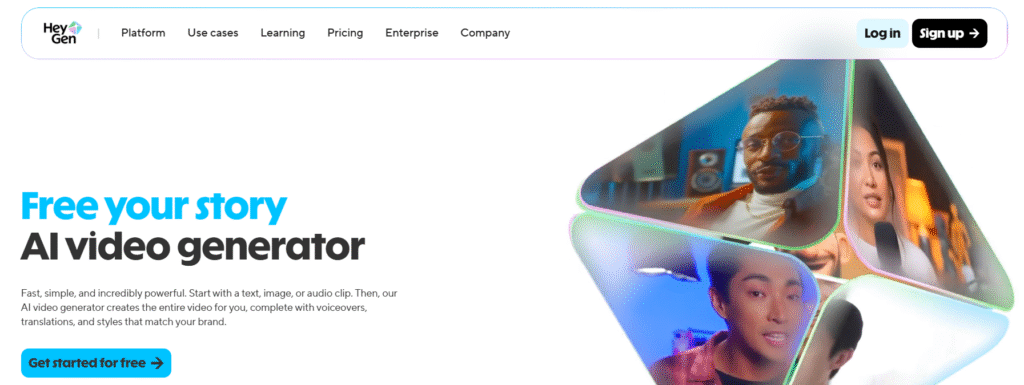
HeyGen is an innovative AI video generator that leverages cutting-edge technology to create videos using customizable avatars and text-to-video capabilities.
It’s designed to help creators produce personalized and engaging content without the need for complex video editing tools. Whether you’re making marketing videos, tutorials, or social media content, HeyGen simplifies the process with its intuitive features. 👩💻✨
Key Features:
- Text-to-Video Technology: Simply enter text, and HeyGen will convert it into a fully-formed video, complete with AI-generated voiceovers and visuals. 📝🎙️
- Customizable Avatars: Choose from a wide variety of AI avatars that can be tailored to suit your video’s tone and style. 🎭
- Background & Scene Customization: Easily customize the background and scenes to align with your branding and creative vision.
- Real-Time Video Rendering: Instantly generate videos in real-time, saving valuable production time.
- Multilingual Support: HeyGen supports multiple languages, making it perfect for global audiences. 🌍
Pros
- ⏱️ Fast Video Creation: Quickly generate videos from text input without the need for manual editing.
- ✓ High-Quality Avatars: Offers diverse and realistic avatars to make videos more engaging.
- 🌟 User-Friendly Interface: Even beginners can easily navigate and use the platform.
- ✓ Customizable Content: Personalize every aspect of your video to make it unique and aligned with your brand.
Cons
- ✕ Limited Advanced Features: Some advanced video editing features, like detailed transitions and effects, are not as robust as in more professional platforms.
- 💸 Subscription-Based Pricing: Full access to all features is only available with a paid plan.
- ✕ Video Length Constraints: The free plan has limitations on the length and quality of videos you can create.
Best Use Cases:
- Content Creators & Influencers: Ideal for creating personalized videos for social media, YouTube, or ads. 📱
- Marketing Professionals: Perfect for making branded videos quickly without the need for professional video editing skills.
- E-Learning & Training: Use customizable avatars to create engaging educational videos or tutorials.
Pricing:
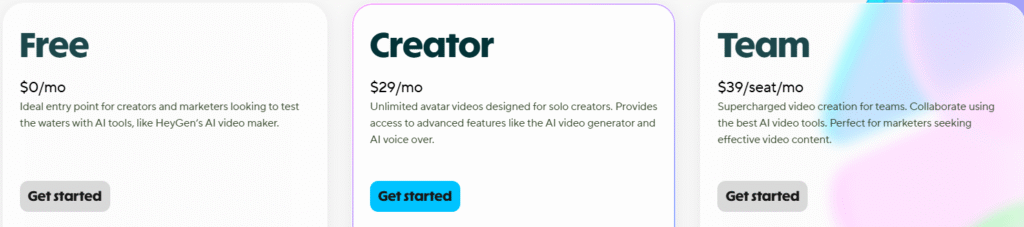
Runway offers several pricing tiers to cater to different users:
| Plan | Price | Details |
|---|---|---|
| Free | $0/mo | Basic features with limited usage. Ideal entry point for creators and marketers. |
| Creator | $29/mo | Unlimited avatar videos, advanced AI features including video generation and AI voiceover. |
| Team | $39/seat/mo | Supercharged video creation for teams. Collaborative features for marketers seeking effective video content. |
HeyGen is a solid choice for those seeking a quick and cost-effective solution for creating engaging, personalized videos. Its text-to-video feature, combined with realistic avatars and multilingual support, makes it a versatile tool for a wide range of use cases. 🎥✨
🎬 Try HeyGen AI – Start Creating Today!
3️⃣. Google Veo AI Video Generator

Google Veo is an AI-driven video creation tool that brings Google’s cutting-edge technology into the world of video production. It focuses on simplifying the editing process by utilizing AI for auto-transcription, scene recognition, and editing automation.
Perfect for content creators who want to optimize their workflow, Google Veo is designed to produce polished videos quickly and efficiently. 📊🎬
Key Features:
- Auto-Transcription and Captions: Automatically transcribe your video content and add captions, making it accessible to a broader audience. 📝
- AI-Powered Editing: Google Veo uses AI to identify key scenes, apply edits, and enhance your video with minimal effort.
- Scene Recognition: Automatically detects different scenes in your footage, which helps in auto-editing and producing seamless transitions.
- Seamless Google Integration: Easily integrate with Google services like Google Drive and YouTube for an efficient workflow. ☁️
- High-Quality Rendering: Produce HD videos with ease, even with the automated features.
Pros
- ⏳ Efficient Video Creation: Save time with automatic editing features like scene detection and captions.
- ✓ Integration with Google Tools: Easy integration with Google services for a seamless experience.
- ✓ User-Friendly Interface: Ideal for beginners who want to create professional videos without steep learning curves.
- ✓ Great for Accessibility: Automatic captions improve the accessibility of your videos.
Cons
- ✕ Limited Advanced Features: Some complex editing features like in-depth effects or transitions are not as robust as in specialized video editing software.
- 🎨 Fewer Customization Options: There’s limited flexibility in customizing video elements beyond basic edits and captions.
- ✕ Subscription Pricing: Advanced features and higher video quality are locked behind paid plans.
Best Use Cases:
- Beginners & Hobbyists: Great for those who want to make quick videos without learning complicated editing tools. 🎥
- Educational Content Creators: Perfect for online courses, webinars, and tutorials that need transcription and easy editing.
- Social Media Creators: Ideal for creating captioned and polished videos quickly for platforms like Instagram and YouTube.
Pricing:

| Plan | Price | Details |
|---|---|---|
| Free | $0/mo | Basic access for everyday help from Google AI to tackle tasks at work, school, or home. |
| Google AI Pro | $19.99/mo | Higher access to new and powerful features to boost your productivity and creativity. |
| Google AI Ultra | $124.99/3 months | Unlock the highest level of access to Google AI, including exclusive features and full video creation capabilities. |
Google Veo is a solid option for content creators who want to simplify their video production process and improve accessibility. Its seamless integration with Google tools makes it a convenient choice for users already embedded in the Google ecosystem. 🧑💻
🎥 Get Started with Google Veo AI – Free Access!
4️⃣. Kling AI Video Generator
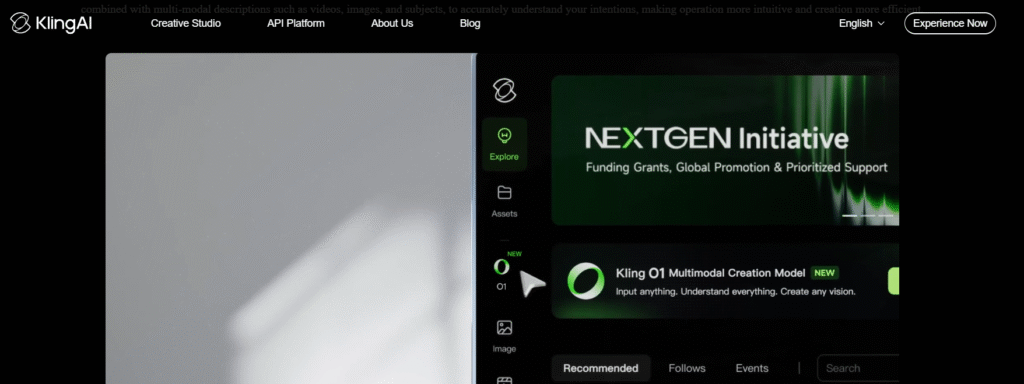
Kling AI is a versatile AI video generation platform that combines powerful video creation tools with real-time collaboration.
Its unique feature is the ability to create dynamic, professional-grade videos using AI, and it offers multilingual support, making it ideal for global content creators. With Kling AI, you can create videos quickly, with features like text-to-video generation and customizable video scenes. 🌍🎥
Key Features:
- Text-to-Video Creation: Convert written scripts into full-fledged videos, complete with voiceovers and relevant visuals. 📝🎤
- Multilingual Support: Kling AI can generate videos in multiple languages, making it perfect for international content creation.
- Real-Time Collaboration: Work on video projects with a team, allowing for real-time edits and adjustments.
- Video Scene Customization: Edit individual scenes, backgrounds, and effects to personalize your video.
- AI-Powered Video Editing: Automatically edit and enhance videos based on the content you input.
Pros
- 🤝 Collaborative Features: Perfect for teams who want to create content together in real time.
- ✓ Wide Language Support: Multilingual capabilities make it ideal for global markets.
- ✓ Customizable Videos: Provides flexibility in editing scenes, backgrounds, and transitions.
- ✓ Fast Video Creation: Generate and render videos quickly without sacrificing quality.
Cons
- 💸 Subscription-Based: Access to advanced features requires a paid plan.
- ✕ Advanced Features May Require Learning: Some of Kling AI’s advanced features may have a learning curve for new users.
- ✕ Limited Templates: While customizable, Kling AI lacks a broad range of pre-built templates compared to other platforms.
Best Use Cases:
- Marketing Teams: Ideal for creating promotional videos in multiple languages for a global audience. 📣
- Corporate Content: Excellent for businesses looking for collaborative video production and quick turnaround times.
- Social Media Creators: Great for creating videos that require rapid edits and various scene customizations.
Pricing:
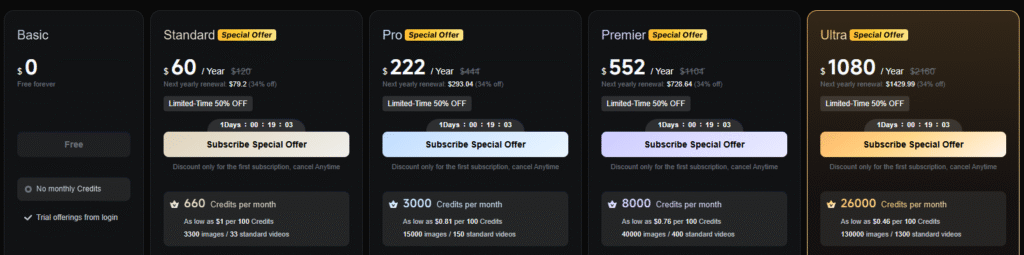
| Plan | Price | Details |
|---|---|---|
| Basic | $0/mo | Free forever with limited access to Kling AI’s features. |
| Standard | $10/mo | Access to additional editing features and tools with 700 monthly video credits. |
| Pro | $35/mo | More speed and features, with 2300 monthly video credits and enhanced tools. |
| Enterprise | Contact for pricing | Custom pricing for large organizations needing advanced features and team collaboration tools. |
Kling AI is a top choice for teams and businesses looking to create dynamic, customizable videos with the power of AI. Its collaborative tools and multilingual support set it apart as an excellent option for global content creation. 🌐✨
🤝 Collaborate & Create with Kling AI – Start Now!
5️⃣. Pika AI Video Generator
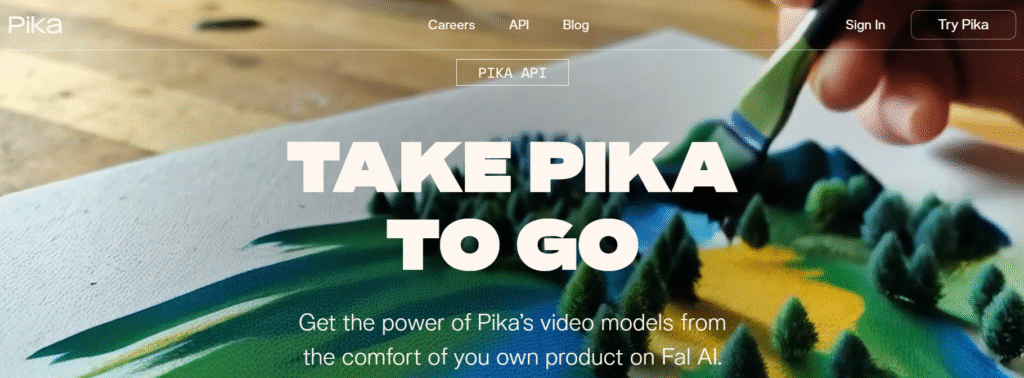
Pika AI is a user-friendly video creation tool designed for those who need quick and efficient video production.
It uses artificial intelligence to simplify the video creation process, offering a drag-and-drop interface and social media-ready templates. Whether you’re a content creator or a business owner, Pika AI helps you create engaging videos in a fraction of the time. 🚀📱
Key Features:
- Drag-and-Drop Video Creation: Easily create videos by dragging and dropping media, text, and effects. 🎞️
- Social Media Templates: Pika AI offers templates optimized for social media platforms like Instagram, Facebook, and YouTube. 📲
- AI-Powered Video Editing: Automatically edit videos, add transitions, and enhance visuals using AI tools.
- Quick Video Rendering: Fast rendering times, ensuring that you can publish your content quickly.
Pros
- 🌟 Beginner-Friendly: Ideal for users with little to no video editing experience.
- ✓ Time-Saving Templates: Ready-to-use templates that make social media video creation a breeze.
- ✓ Fast Video Generation: Quickly create and export videos without the long wait times associated with traditional editing.
- 💰 Affordable: Lower pricing tiers make it accessible for small businesses and independent creators.
Cons
- ✕ Limited Customization for Advanced Users: Some experienced users may find the customization options too basic.
- ❌ Free Plan Limitations: The free plan has watermarks, and videos are limited to standard definition.
- ✕ Fewer Advanced Features: Lacks some of the more advanced editing tools found in other platforms like Runway.
Best Use Cases:
- Social Media Marketers: Perfect for creating quick, eye-catching videos for platforms like Instagram and Facebook. 📱
- Content Creators: Ideal for YouTubers and vloggers who need a simple, fast video creation tool.
- Small Businesses: Affordable and efficient tool for businesses looking to create video ads or promotional content.
Pricing:
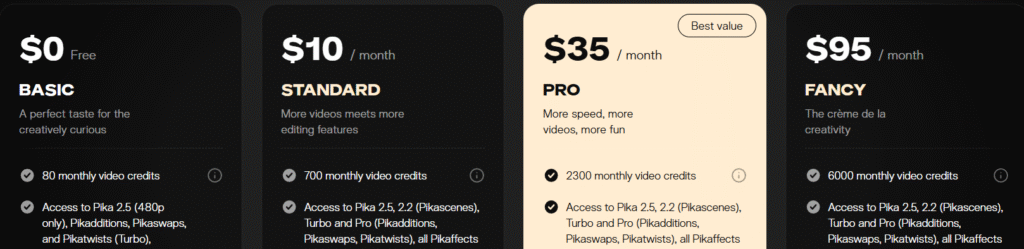
| Plan | Price | Details |
|---|---|---|
| Basic | $0/mo | Perfect for creatively curious individuals with 80 monthly video credits. |
| Standard | $10/mo | More videos and editing features with 700 monthly video credits. |
| Pro | $35/mo | More speed, more videos, and more fun with 2300 monthly video credits and enhanced features. |
| Fancy | $95/mo | The crème de la creativity with 6000 monthly video credits and all premium features. |
Pika AI is a great choice for those who need a simple, efficient tool to create social media videos and promotional content. Its easy interface, combined with AI-powered features, makes it ideal for quick video production. 🎥✨
✨ Create Stunning Videos with Pika AI – Try Now!
📌 Comparison of the 5 Best AI Video Generators
| Feature | Runway AI | HeyGen AI | Google Veo AI | Pika AI | Kling AI |
|---|---|---|---|---|---|
| Pricing | Free, $12/month, $28/month, $76/month | Free, $29/month, $39/seat/month | Free, $19.99/month, $124.99/3 months | Free, $10/month, $35/month, $95/month | Free, $10/month, $35/month |
| Free Plan | Yes, with 125 credits | Yes | Yes | Yes | Yes |
| Text-to-Video | Yes | Yes | Yes | Yes | Yes |
| AI Voiceovers | Yes | Yes | No | No | Yes |
| Customizable Avatars | No | Yes | No | No | Yes |
| Real-Time Collaboration | Yes | No | No | No | Yes |
| Multilingual Support | No | Yes | No | No | Yes |
| Video Export Quality | HD/4K | HD | HD | HD | HD/4K |
| Best For | Professionals & teams | Social media content creators | Beginners & YouTubers | Social media content & small businesses | Marketing teams & global creators |





Key Takeaways:
- Runway AI offers comprehensive features, including text-to-video, real-time collaboration, and AI voiceovers, making it a top choice for professionals.
- HeyGen AI stands out for customizable avatars and multilingual support, ideal for personalized content creation.
- Google Veo AI is great for beginners who need basic video editing and transcription, with easy-to-use features.
- Pika AI is affordable and user-friendly, perfect for social media creators and small businesses looking to create fast, high-quality content.
- Kling AI excels in real-time collaboration and multilingual support, making it a strong choice for teams working on global content.
📌 How to Choose the Best AI Video Generator for Your Needs
When choosing an AI video generator, it’s important to align your decision with your goals. Here’s a more defined approach to help you pick the right tool:
1. Define Your Purpose 🎯
- Content Creation: Choose tools with social media templates (e.g., HeyGen, Pika AI).
- Marketing: Look for advanced features like voiceovers and branding (e.g., Runway, Kling AI).
- Education: Opt for tools with text-to-video and explanatory visuals (e.g., Google Veo).
2. Video Length & Complexity ⏳
- Short Videos: Quick generation tools (e.g., Pika AI).
- Long Videos: Look for AI editing and scene detection (e.g., Runway).
3. AI Features & Customization 🔧
- Text-to-Video: Quickly generate videos from scripts (e.g., HeyGen, Google Veo).
- AI Editing: Automate editing tasks (e.g., Runway, Kling AI).
- Voiceovers: Choose platforms with AI-powered voiceover options.
4. Ease of Use 🖥️
- Beginner-Friendly: Simple interfaces and templates (e.g., Pika AI).
- Advanced Editing: More features for experienced users (e.g., Runway).
5. Collaboration 🤝
- Team Projects: Real-time collaboration and multi-user access (e.g., Kling AI).
6. Pricing 💸
- Free Plans: Good for testing (e.g., HeyGen, Pika AI).
- Paid Plans: Access to premium features (e.g., Runway Pro, Kling AI Team).
7. Video Quality 🔝
- Ensure HD or 4K export options for high-quality content.
8. Customer Support 📞
- Look for platforms with responsive support and helpful guides.
“If you’re interested in learning more about AI-driven video editing tools, check out this in-depth guide on AI Video Editing from Coursera.”
📌 Conclusion
Choosing the right AI video generator can make a huge difference in how efficiently and effectively you create video content. Whether you’re a beginner, team, or social media creator, there’s a perfect tool for you.
- Runway AI is ideal for professionals who need powerful features and collaboration tools.
- HeyGen AI excels at creating personalized, engaging videos, especially for social media and marketing.
- Google Veo AI is great for beginners, providing an easy-to-use platform for basic video creation.
- Pika AI offers the best value for creators on a budget, providing essential features with great ease of use.
- Kling AI is perfect for teams and global content creators who need collaboration and multilingual support.
With these tools at your disposal, you can take your video content to the next level quickly, easily, and without the steep learning curve. Choose the one that fits your needs, and start creating amazing videos today! 🎥✨
RELATED ARTICLES
❓FAQs
1. What is the best AI video generator in 2025?
Answer: The best AI video generator in 2025 depends on your needs, but Runway AI is considered the top choice for professionals, while Pika AI offers great value for beginners and budget-conscious creators.
2. Can AI video generators create YouTube videos?
Answer: Yes, most AI video generators like Runway AI and HeyGen AI can create high-quality YouTube videos with templates and customizable features that meet platform requirements.
3. Are AI video generators free to use?
Answer: Many AI video generators, including Pika AI and Google Veo AI, offer free plans with basic features, but more advanced tools and higher-quality exports usually require a paid plan.
4. How accurate are AI-generated videos?
Answer: AI-generated videos are highly accurate, especially with tools like Runway AI and Kling AI, which use advanced AI to produce professional-grade content with minimal human input.
5. Can I edit AI-generated videos after creation?
Answer: Yes, most AI video generators, including Runway AI and Pika AI, allow you to make post-creation edits such as trimming, scene changes, and adding effects to fine-tune your video.