
AI voice generators have changed a lot in the last few years. Earlier, most voices sounded robotic and flat.
In 2025, the best AI voice generators can speak with emotion, proper pauses, and natural flow, almost like a real human talking.
Use ElevenLabs Free – Hear Human Like AI Voices 🎙️
But here’s the problem 👇
Not every AI voice tool is worth your time or money.
Some tools are great for YouTube videos, some are perfect for podcasts, and some are best for voice cloning or quick social media content. That’s why choosing the right one matters.
To make this easy for you, we tested and analyzed multiple tools based on:
- Voice realism and natural sound 😊
- Ease of use for beginners
- Features like emotion control and language support
- Pricing and free plan availability
- Real-world use cases like videos, podcasts, ads, and learning content
After comparing everything, here are the Top 5 AI Voice Generators that truly stand out in 2025 👇
🔹 Our Top 5 Picks at a Glance
1️⃣ ElevenLabs – Best overall AI voice generator for realistic human voices
2️⃣ Murf AI – Best for YouTube videos and professional voiceovers
3️⃣ Play.ht – Best AI voice generator for podcasts and long audio
4️⃣ Resemble AI – Best for voice cloning and custom brand voices
5️⃣ Canva AI Voice Generator – Best for beginners and quick content creation
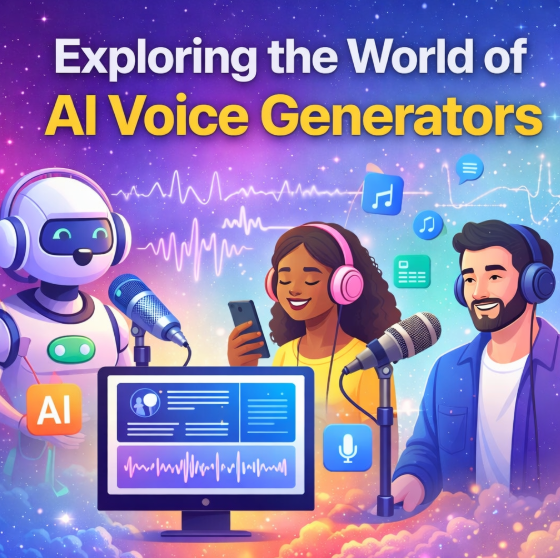
Each of these tools excels in a different area, so there is no single “one-size-fits-all” option.
In the next sections, we’ll break down each AI voice generator in detail, explain its features in simple language, share pros and cons, and help you decide which one is right for you 👍
📌 Quick Comparison Table: Best AI Voice Generators 📊🎧
Before diving deep into individual reviews, it’s important to see how all the top AI voice generators compare at a glance. This section helps you quickly understand which tool fits your needs without reading everything word by word 😊
Whether you care about voice quality, pricing, languages, or free plans, this comparison will save you time.
🔍 Side by Side Comparison of Top AI Voice Generators
| AI Voice Generator | Best For | Voice Quality | Languages | Free Plan | Pricing Starts From |
|---|---|---|---|---|---|
| 1️⃣ ElevenLabs | Ultra realistic voices and storytelling | Extremely natural and human-like 🎙️ | 50+ | Yes | Paid plans available |
| 2️⃣ Murf AI | YouTube videos and professional voiceovers | Clean and professional 🎬 | 20+ | Yes | Subscription based |
| 3️⃣ Play.ht | Podcasts and long-form audio | Natural with multiple tones 🎧 | 40+ | Yes | Tiered pricing |
| 4️⃣ Resemble AI | Voice cloning and custom brand voices | Highly customizable 🎤 | 15+ | Limited | Premium plans |
| 5️⃣ Canva AI Voice Generator | Beginners and quick content | Simple and decent quality ✨ | Multiple | Yes | Free with Pro option |
1️⃣ ElevenLabs : Most Realistic AI Voice Generator 🎙️🔥
ElevenLabs is widely considered the best AI voice generator when it comes to sounding like a real human. If your top priority is natural tone, emotion, and clarity, this tool clearly stands out in 2026.
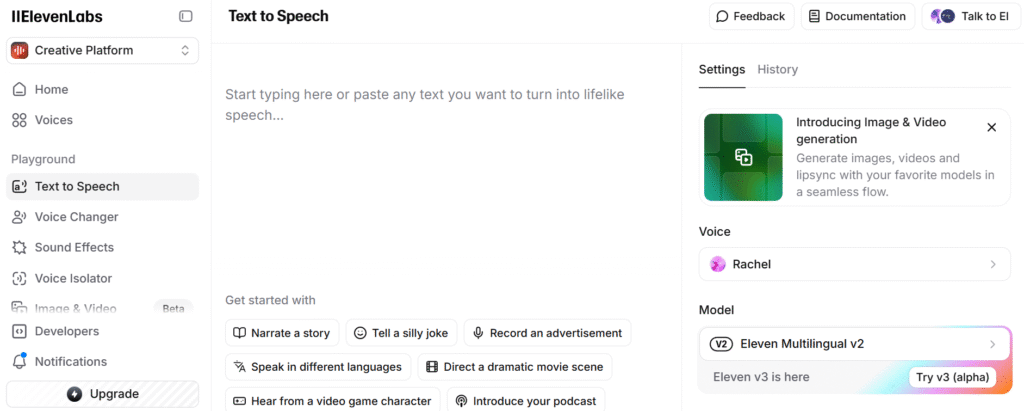
What makes ElevenLabs special is how human the voices feel. The pauses, breathing style, emotions, and flow do not sound artificial. Many creators use it for storytelling, audiobooks, YouTube narration, and even professional voiceover work.
🌟 Why ElevenLabs Feels More Human Than Others
ElevenLabs uses advanced AI models that understand how humans actually speak. Instead of reading text word by word, it focuses on emotion, pacing, and expression 😊
You can create voices that sound: Calm and friendly | Serious and professional | Emotional and expressive | Confident and clear
This makes it perfect for content where voice quality really matters.
🔧 Key Features of ElevenLabs
- Ultra realistic text to speech that feels natural and smooth 🎧
- Emotion and tone control to match your content style
- Multiple voice styles for different use cases
- Supports many languages and accents 🌍
- High quality audio export suitable for professional use
Even beginners can start quickly because the interface is simple and clean.
🎯 Best Use Cases for ElevenLabs
ElevenLabs works best if you are creating:
- YouTube videos and explainers 🎥
- Podcasts and storytelling content 🎙️
- Audiobooks and narration projects 📘
- Educational or training material
- Marketing and promotional videos
If your audience listens carefully to your content, this tool adds real value.
💰 Pricing and Free Plan
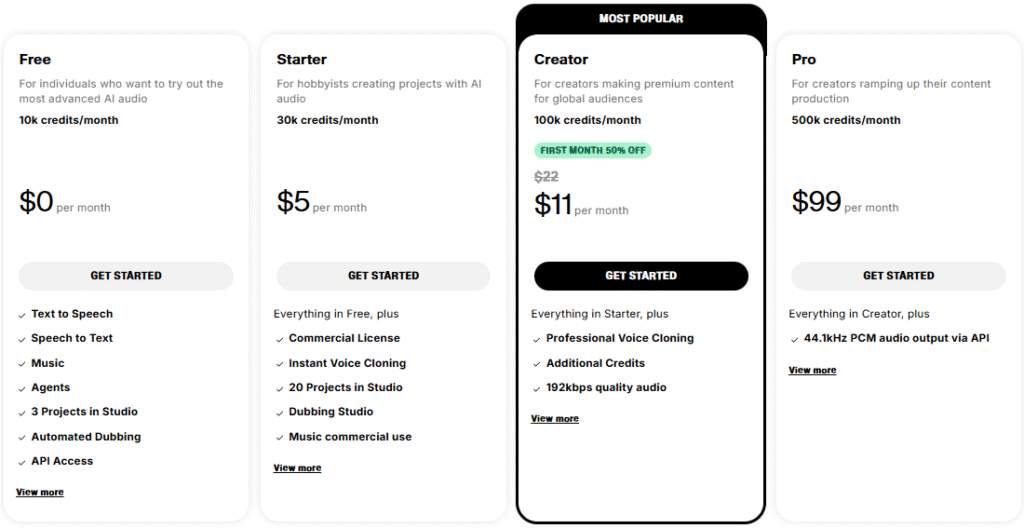
| Plan | Best For | Credits per Month | Price |
|---|---|---|---|
| Free | Beginners testing AI audio | 10k credits | $0 per month |
| Starter | Hobbyists and small projects | 30k credits | $5 per month |
| Creator (Most Popular) | Creators making premium content | 100k credits | $11 per month (50% off first month) |
| Pro | High volume content creators | 500k credits | $99 per month |
Pros & Cons
Pros of ElevenLabs
- 😍 Extremely natural and human-like voices
- ✓ Great emotional control
- ✓ Easy to use interface
- ✓ High quality output
Cons of ElevenLabs
- ✕ Premium plans can feel expensive for heavy users
- ✕ Free plan has limited usage
🧠 Final Thoughts on ElevenLabs
If you want the most realistic AI voice generator available today, ElevenLabs is the top choice.
It is ideal for creators who care about quality and want their content to sound professional and engaging.
Use ElevenLabs Free – Hear Human Like AI Voices 🎙️
2️⃣ Murf AI : Best for YouTube and Professional Voiceovers 🎥🎙️
Murf AI is one of the most popular AI voice generators for people who create YouTube videos, presentations, ads, and business content. If you want clean, professional sounding voices without spending hours editing audio, Murf AI is a strong option in 2025.
Unlike tools that focus only on realism, Murf AI focuses on clarity, control, and ease of use. That’s why many marketers and video creators prefer it.
🌟 What Makes Murf AI Different
Murf AI is designed for people who want fast and polished results. You don’t need any audio editing skills. You simply type your text, choose a voice, and adjust the tone to match your content 😊
The voices sound confident, clear, and professional, which is perfect for explainer videos and business narration.
🔧 Key Features of Murf AI
- High quality AI voices suitable for videos and ads 🎬
- Large library of professional voice styles
- Voice speed and tone adjustment options
- Built in voice editing tools
- Supports multiple languages and accents 🌍
Murf AI also allows you to sync voiceovers with visuals, which is very helpful for video creators.
🎯 Best Use Cases for Murf AI
Murf AI works best for:
- YouTube videos and explainer content 📺
- Marketing and promotional videos
- Corporate presentations and training
- E learning courses and tutorials 🎓
- Product demos and ads
If your goal is to sound professional and trustworthy, Murf AI delivers consistent results.
💰 Pricing and Free Plan
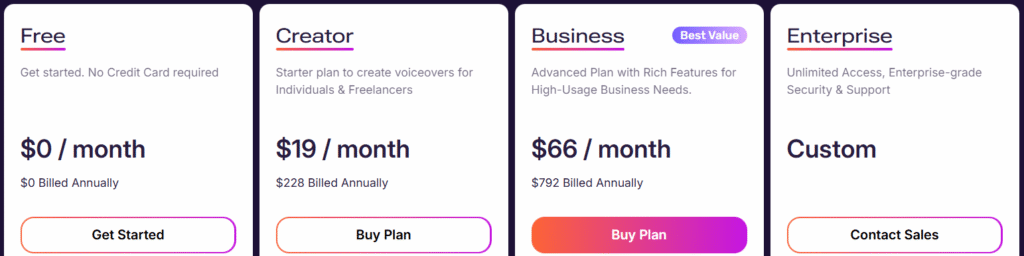
| Plan | Best For | Monthly Price | Billing Type |
|---|---|---|---|
| Free | Beginners trying AI voiceovers | $0 | Free forever |
| Creator | Individuals and freelancers | $19 per month | $228 billed annually |
| Business (Best Value) | High usage and business needs | $66 per month | $792 billed annually |
| Enterprise | Large teams and enterprises | Custom | Contact sales |
Pros & Cons
Pros of Murf AI
- 😊 Very easy to use for beginners
- ✓ Professional sounding voices
- ✓ Good control over pacing and tone
- ✓ Ideal for video content
Cons of Murf AI
- ✕ Voices sound more professional than emotional
- ✕ Limited customization compared to advanced tools
🧠 Final Thoughts on Murf AI
If you create YouTube videos, ads, or business presentations, Murf AI is one of the safest and most reliable AI voice generators you can choose. It may not be the most emotional, but it delivers clean and professional voiceovers every time.
Try Murf AI Free – Create Pro Voiceovers Fast 🎥
3️⃣ Play.ht : Best AI Voice Generator for Podcasts and Long Audio 🎧🎙️
Play.ht is a powerful AI voice generator built mainly for podcasts, narration, and long-form audio content. If you create content where listeners stay for a long time, voice consistency and comfort matter a lot, and this is where Play.ht performs really well.
Unlike tools focused only on short clips or ads, Play.ht is optimized for longer recordings that still sound smooth and natural 😊
🌟 Why Play.ht Is Great for Long Audio
Play.ht focuses on listening comfort. The voices are clear, balanced, and easy on the ears, even during long sessions. This makes it a great choice for podcasters, audiobook creators, and bloggers converting text into audio.
It also offers a very large voice library, giving you plenty of options to match your content style.
🔧 Key Features of Play.ht
- Large library of AI voices across many styles 🎙️
- Supports more than 40 languages and accents 🌍
- Natural pacing suitable for long content
- Multi speaker support for conversations
- Easy text to speech conversion
Play.ht also works well for people who want to turn b
🎯 Best Use Cases for Play.ht
Play.ht is ideal for:
- Podcasts and talk style audio 🎧
- Audiobooks and storytelling
- Long educational content
- Blog to audio conversion 📝
- Multilingual voice projects
If your audience listens for 10 minutes or more, Play.ht is a smart choice.
💰 Pricing and Free Plan
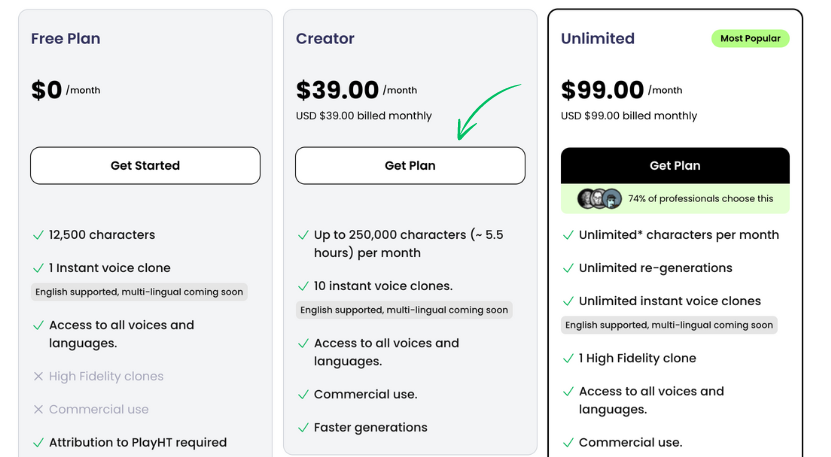
| Plan | Best For | Price | Key Highlights |
|---|---|---|---|
| Free Plan | Beginners testing the tool | $0 per month | 12,500 characters, instant voice clone, attribution required |
| Creator | Regular creators and freelancers | $39 per month | Up to 250,000 characters, 10 instant voice clones, commercial use |
| Unlimited (Most Popular) | High volume and professional users | $99 per month | Unlimited characters, unlimited clones, high fidelity voice |
Pros & Cons
Pros of Play.ht
- 😊 Comfortable voices for long listening
- ✓ Huge voice and language selection
- ✓ Easy to use platform
- ✓ Good value for podcasters
Cons of Play.ht
- ✕ Not the best option for emotional storytelling
- ✕ Editing options are basic
🧠 Final Thoughts on Play.ht
If you focus on podcasts, audiobooks, or long narration, Play.ht is one of the best AI voice generators available. It keeps voices natural and listener friendly, which is crucial for long audio content.
Use Play.ht Free – Turn Text Into Podcast Voices 🎧
4️⃣ Resemble AI : Best for Voice Cloning and Custom Brand Voices 🎤🧠
Resemble AI is a powerful AI voice generator made for users who want custom voices that sound unique and personal. If you want an AI voice that represents a specific person or brand, this tool is built exactly for that purpose.
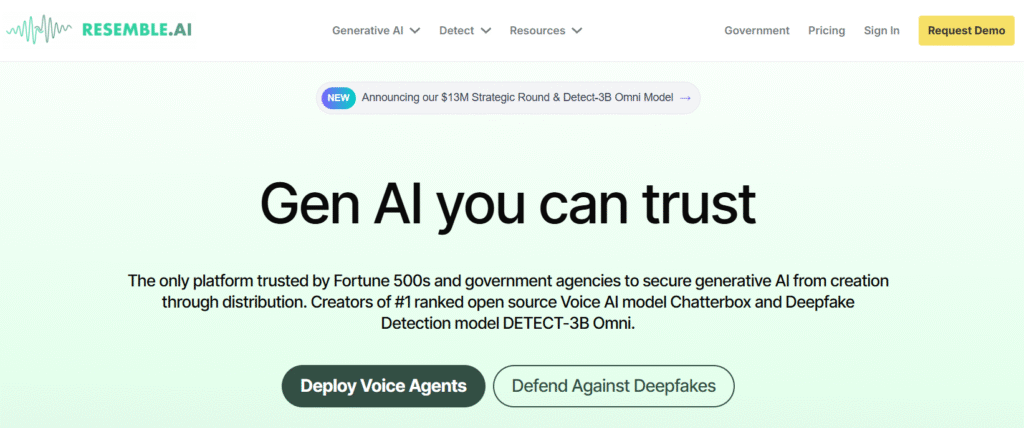
Unlike other tools that focus only on ready made voices, Resemble AI lets you create and control your own voice style 😊
🌟 What Makes Resemble AI Special
Resemble AI is well known for its voice cloning technology. You can train the system using voice samples and generate speech that closely matches the original voice.
This is extremely useful for brands, games, apps, and creators who want consistent voice identity across all content.
🔧 Key Features of Resemble AI
- Advanced voice cloning with high accuracy 🎙️
- Emotion and tone customization
- Real time voice generation support
- Multiple language support 🌍
- Suitable for commercial and brand use
The platform gives you fine control over how the voice sounds, which is rare in most AI voice tools.
🎯 Best Use Cases for Resemble AI
Resemble AI works best for:
- Creating a brand specific voice 🏢
- Voice cloning for apps or games 🎮
- Personalized marketing content
- Interactive voice experiences
- Developers building voice features
If having a unique voice matters to your identity, Resemble AI is a strong choice.
💰 Pricing and Free Plan

| Plan | Best For | Price | Key Highlights |
|---|---|---|---|
| Pay As You Go (Credits) | Occasional users and testing | Based on usage | Free 150 seconds, flexible credit top ups |
| Creator (Most Popular) | Individual creators and freelancers | $9.50 first month, then $19 per month | Professional voice cloning, affordable entry |
| Professional | Growing teams and scaling projects | $99 per month | Localization, priority support, volume discounts |
| Business | Large scale and enterprise integrations | $699 per month | Full API access, enterprise grade usage |
Pros & Cons
Pros of Resemble AI
- 😍 High quality voice cloning
- ✓ Custom emotion control
- ✓ Ideal for branding and personalization
- ✓ Developer friendly features
Cons of Resemble AI
- ✕ Not beginner friendly
- ✕ Setup takes more time
- ✕ Pricing is higher than basic tools
🧠 Final Thoughts on Resemble AI
If you need custom voices or voice cloning, Resemble AI is one of the best AI voice generators available today. It is perfect for serious projects where identity and control are important.
Try Resemble AI Free – Clone Voices Instantly 🎤
5️⃣ Canva AI Voice Generator : Best for Beginners and Quick Content 🎨🎙️
Canva AI Voice Generator is a great option for people who want to create voiceovers quickly and without any technical skills. If you already use Canva for designs, social media posts, or videos, this tool fits naturally into your workflow.
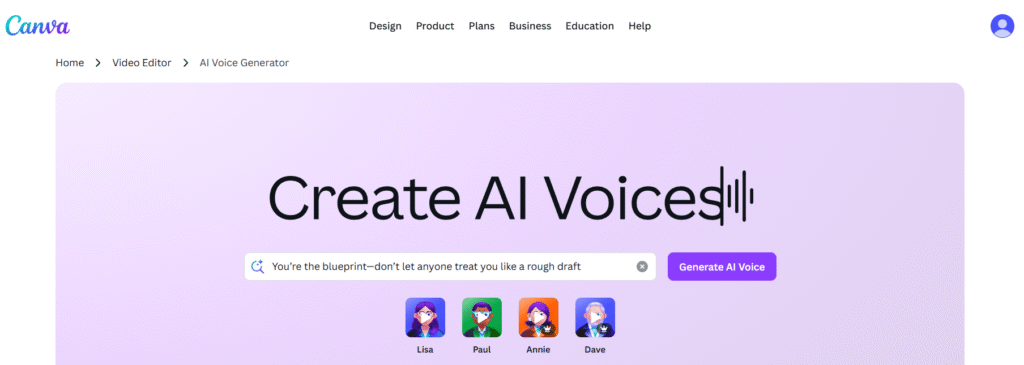
It is not built for advanced voice control, but it shines in simplicity and speed 😊
🌟 Why Canva AI Voice Generator Is Beginner Friendly
The biggest advantage of Canva AI Voice Generator is how easy it is to use. You don’t need to learn a new platform or understand audio editing. You just type your text, choose a voice, and generate audio in seconds.
This makes it perfect for beginners who want results fast 👍
🔧 Key Features of Canva AI Voice Generator
- Simple text to speech conversion 🎤
- Decent quality AI voices for everyday use
- Works directly inside Canva projects 🎨
- Supports multiple languages 🌍
- Free access with optional Pro features
You can easily add voiceovers to videos, presentations, and social posts without switching tools.
🎯 Best Use Cases for Canva AI Voice Generator
Canva AI Voice Generator is ideal for:
- Social media videos and reels 📱
- Presentations and slides
- Short marketing clips
- Educational visuals
- Beginners learning AI voice tools
If you want fast output without complexity, Canva is a solid choice.
💰 Pricing and Free Plan
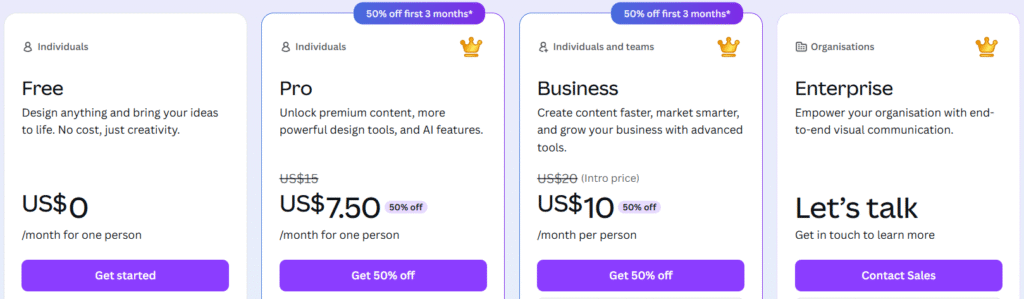
| Plan | Best For | Price | Key Highlights |
|---|---|---|---|
| Free | Individuals starting out | US$0 per month | Basic design tools, free templates, no cost |
| Pro | Individual creators | US$7.50 per month | Premium templates, AI tools, 50% off first 3 months |
| Business | Individuals and teams | US$10 per person per month | Team tools, brand kits, advanced AI features |
| Enterprise | Large organisations | Custom pricing | End to end visual communication, dedicated support |
Pros & Cons
Pros of Canva AI Voice Generator
- ✓ Extremely easy to use
- ✓ No learning curve for beginners
- ✓ Works well with Canva designs
- 🎉 Free plan available
Cons of Canva AI Voice Generator
- ✕ Limited voice customization
- ✕ Not suitable for advanced narration
- ✕ Voices are less expressive than premium tools
🧠 Final Thoughts on Canva AI Voice Generator
If you are a beginner or need quick voiceovers for simple content, Canva AI Voice Generator is a smart and stress free choice. It may not replace professional tools, but it gets the job done fast.
Use Canva AI Voice Free – Create Audio in Seconds 🎨
📌 How AI Voice Generators Work (Text to Speech Explained) 🤖🎙️
AI voice generators convert written text into natural sounding human speech using advanced text to speech and machine learning technology. These tools are trained on real human voices, which is why modern AI voices sound clear, expressive, and realistic 😊
Here is the full process explained in very simple terms.
1️⃣ Text Analysis Using Natural Language Processing 🧠📄
First, the AI reads your text and understands how it should be spoken. This is done using Natural Language Processing, also called NLP.
The system looks at:
- Grammar and sentence structure
- Punctuation like commas and full stops
- Tone of the sentence such as question or statement
- Context to decide emphasis
This step helps the AI know where to pause, which words to stress, and how the sentence should flow so the voice does not sound robotic.
2️⃣ Phoneme Conversion for Accurate Pronunciation 🔤🎧
Next, the text is broken into phonemes, which are the smallest sound units in speech like ba, ee, sh.
This step ensures:
- Correct pronunciation of words
- Better accent handling
- Smooth speech in different languages 🌍
Because of phoneme conversion, AI voice generators can speak clearly even with complex or unfamiliar words.
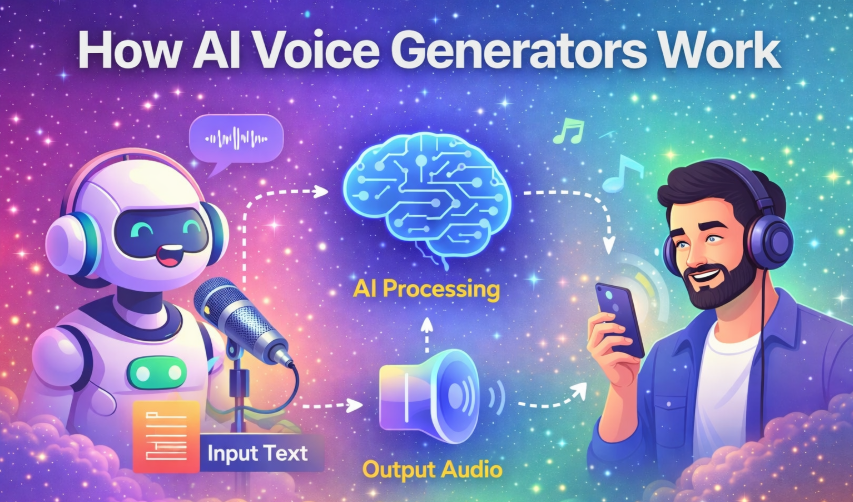
3️⃣ Voice Modeling Using Neural Text to Speech 🎤🧠
This is the most important step.
Modern AI voice generators use neural text to speech models trained on hours of real human recordings. These models learn how humans actually speak, not just how words are read.
The AI learns:
- Pitch and tone changes
- Natural pauses and pacing
- Emotion and expression
- Accent and speaking style
This is why AI voices today sound human, consistent, and expressive instead of flat or robotic 😍
4️⃣ Prosody and Emotion Control ❤️🎶
Advanced AI voice tools add something called prosody, which means the rhythm, stress, and melody of speech.
Many tools allow you to control:
- Voice speed and pitch
- Emotion like calm, excited, serious
- Emphasis on specific words
This feature is very useful for storytelling, videos, ads, and podcasts where emotion matters.
5️⃣ Audio Synthesis and Final Output 🎧📁
In the final step, everything is combined into a clean audio file. The AI generates an audio waveform and exports it as MP3 or WAV format.
High quality AI voice generators also:
- Reduce background noise automatically
- Improve clarity and volume
- Optimize audio for professional use
The result is ready to use audio without any manual editing 👍
Why Modern AI Voices Sound So Real ✨🎙️
AI voice generators today sound realistic because they:
- Are trained on large and diverse human voice datasets
- Use neural synthesis instead of robotic sound joining
- Continuously improve with feedback and updates
This makes them suitable for professional content creation.
📌 Why Use AI Voice Generators? Real-World Use Cases
AI voice generators are no longer just a tech demo they’re practical tools saving time, money, and effort across many industries. Here’s why people actually use them in the real world 👇
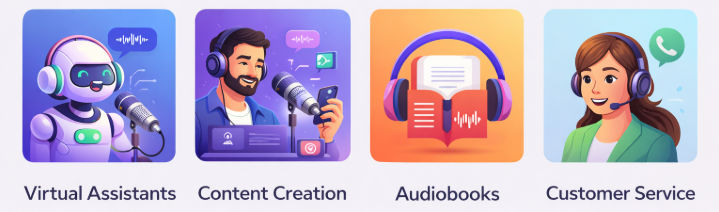
🎥 1. YouTube Videos & Content Creation
Creators use AI voices for:
- Faceless YouTube channels
- Explainer videos
- Shorts, reels, and long-form videos
👉 Why it works:
You don’t need a microphone, studio, or voice actor. AI voices are consistent and available 24/7.
📚 2. Audiobooks & Podcast Narration
AI voice generators are widely used to:
- Convert blogs into audiobooks
- Narrate podcasts
- Create educational audio content
👉 Why it works:
High-quality voices sound natural and can narrate hours of content without fatigue.
📢 3. Marketing & Advertisements
Marketers use AI voices for:
- Video ads
- Product demos
- Social media promotions
👉 Why it works:
You can quickly test different tones (friendly, professional, energetic) without re-recording.
🎓 4. E-Learning & Online Courses
Used for:
- Course lessons
- Tutorials
- Training videos
👉 Why it works:
Clear pronunciation and adjustable speed make content easier to understand for learners.
📞 5. Customer Support & IVR Systems
Businesses use AI voices in:
- Call center IVR
- Chatbots with voice output
- Automated customer service
👉 Why it works:
AI handles repetitive calls, reduces costs, and works around the clock.
🌍 6. Accessibility & Assistive Technology
AI voices help:
- Visually impaired users
- People with speech difficulties
- Language learners
👉 Why it works:
Text-to-speech improves access to information for everyone.
🌐 7. Localization & Multilingual Content
Used to:
- Translate and dub videos
- Create content in multiple languages
👉 Why it works:
One script can become many languages without hiring multiple voice actors.
🧠 8. Business Presentations & Internal Training
Teams use AI voices for:
- Product walkthroughs
- Sales presentations
- Internal training videos
👉 Why it works:
Professional narration without scheduling voice talent.
✅ Final Takeaway
AI voice generators are used because they are:
- Fast ⚡
- Cost-effective 💰
- Scalable 📈
- Consistent 🎙️
Whether you’re a creator, business owner, or educator, AI voice generators turn text into professional-quality audio without the usual hassle.
Try Murf AI Free – Create Pro Voiceovers Fast 🎥
📌 How to Choose the Right AI Voice Generator 🤔🎙️
Choosing the right AI voice generator is important because every tool is built for a different purpose. Some focus on realistic human voices, some are designed for speed, and others are better for branding or business use. If you select the wrong tool, you may waste time, money, and effort.
This section will help you make the right decision based on your actual needs.
1. Voice Quality and Natural Sound 🎧✨
Voice quality should always be your first priority. A good AI voice generator should sound natural, clear, and comfortable to listen to. The voice should have smooth flow, proper pauses, and correct pronunciation so it does not feel robotic.
Most modern tools offer a free plan for testing, which allows you to check how realistic the voice sounds before upgrading. Always test a few sentences and listen carefully before making a decision 😊
2. Purpose of Your Content 🎯📢
Different AI voice generators are designed for different types of content. Choosing a tool that matches your goal makes content creation much easier.
If you create YouTube videos or ads, you need a confident and clear voice. For podcasts or audiobooks, the voice should be comfortable for long listening sessions. Branding and app based projects benefit from custom or cloned voices, while social media creators often prefer fast and simple voice generation.
Understanding your content purpose helps you avoid unnecessary features and costs.
3. Ease of Use for Beginners 😊🖱️
If you are new to AI voice tools, ease of use matters a lot. A beginner friendly platform saves time and reduces frustration. Look for tools that offer a clean interface, simple text editing, and quick voice generation.
Easy tools allow you to focus on creating content instead of learning complicated settings, which is especially helpful for solo creators.
4. Language and Accent Support 🌍🗣️
If your audience includes people from different regions, language and accent support becomes important. Many AI voice generators support multiple languages and accents, helping you reach a global audience.
This feature is very useful for creators who want to expand internationally without hiring multiple voice actors.
5. Customization and Emotion Control ❤️🎶
Some AI voice generators allow you to adjust speed, pitch, and emotion. These controls are helpful when creating storytelling content, marketing videos, or educational material.
Emotion control helps the voice sound calm, energetic, serious, or friendly depending on your content type. This makes your audio more engaging and natural.
6. Pricing and Free Testing Options 💰😊
Before choosing any tool, always check pricing carefully. Many AI voice generators offer free testing options so you can try voice quality and features before paying.
Paid plans usually unlock longer audio limits, better voice quality, and commercial usage rights. Choosing a plan that matches your usage level helps you avoid overpaying.
Use Canva AI Voice Free – Create Audio in Seconds 🎨
📌 Pros and Cons of AI Voice Generators ⚖️🎙️
AI voice generators offer many benefits, but they also have a few limitations. Understanding both sides helps you set the right expectations and choose the best tool for your needs.
| Aspect | Pros 😊 | Cons ⚠️ |
|---|---|---|
| Voice Quality | Modern AI voices sound natural, clear, and human like | Some free voices may sound less expressive |
| Time Saving | Voiceovers are generated in seconds without recording | Fine tuning emotions may take extra effort |
| Cost | Much cheaper than hiring professional voice actors | Advanced features require paid plans |
| Ease of Editing | You can edit text instead of re recording audio | Limited manual control compared to real voices |
| Scalability | Easy to create large amounts of audio content | Usage limits apply on lower plans |
| Language Support | Multiple languages and accents supported 🌍 | Accent accuracy can vary by tool |
| Accessibility | Makes content accessible to more users ♿ | Requires internet access |
📌 Free vs Paid AI Voice Generators: Which One Should You Choose? 💰🎙️
Many users start with free AI voice generators, but paid plans offer more control and better quality. This table will help you clearly understand the difference so you can choose the right option for your needs 😊
| Feature | Free AI Voice Generators 😊 | Paid AI Voice Generators 🚀 |
|---|---|---|
| Voice Quality | Decent but limited realism | More natural and human like voices |
| Usage Limits | Short audio length and character limits | Longer audio and higher usage limits |
| Customization | Basic speed and tone options | Advanced control over emotion and pitch |
| Voice Variety | Limited number of voices | Large voice libraries and styles |
| Commercial Use | Usually not allowed | Allowed for business and monetization |
| Language Support | Fewer languages available | Wide language and accent support 🌍 |
| Audio Quality | Standard output quality | High quality professional audio |
| Best For | Testing and small projects | Serious creators and businesses |
Which Option Is Right for You? 🤔💡
If you are just exploring AI voice generators or creating small personal projects, free plans are a good starting point. They help you test voice quality and understand how the tool works.
If you create content regularly, monetize your videos, or need professional audio, paid plans offer better value in the long run. You get more control, better sound, and fewer limitations, which improves overall content quality 👍
“RELATED ARTICLES”
FAQs ❓🎙️
1. What is the best AI voice generator in 2025? 🤖
ElevenLabs is considered the best for realistic and human sounding voices.
2. Are AI voice generators free to use? 💰
Most tools offer a free plan for testing, but paid plans unlock full features.
3. Can I use AI voices for commercial projects? 📢
Yes, but only with paid plans that include commercial usage rights.
4. Do AI voice generators sound human? 🎧
Yes, modern AI voices sound natural and expressive.
5. Do AI voice generators support multiple languages? 🌍
Yes, many tools support multiple languages and accents.