
Ever wished you could focus fully on your meetings without stressing about taking notes? ✍️
Notta AI does that for you live transcription, instant summaries, and no more missed action items.
Whether you’re a student, creator, or business professional, Notta turns conversations into clear, accurate text with just one click. 🎧
Ready to save time, boost productivity, and finally enjoy meetings again?
Let’s dive into this honest Notta AI Review to see if it’s the perfect tool for you! 🚀
#1 What is Notta AI? (Who Should Use It?)
Notta AI is a smart transcription and meeting notes tool that listens to your conversations whether in Zoom, Google Meet, Microsoft Teams, or even offline recordings and converts them into clean, readable text within seconds. It also creates AI-generated summaries so you don’t have to write notes manually.
Think of it as your personal note-taking assistant that never gets tired or misses important details.
🎯 Who Is Notta AI Best For?
| User Type | What They Get |
|---|---|
| Students | Instant class notes, lecture summaries, research transcription |
| YouTubers & Podcasters | Fast subtitles + script extraction |
| Journalists & Content Creators | Interview-to-article in minutes |
| Sales & Business Teams | Auto summaries of client calls |
| Doctors, Lawyers, Researchers | Accurate documentation from voice |
| Anyone attending online meetings | No more typing notes while talking |
🧠 Key Benefits in Simple Words
- Saves hours of manual note-taking
- Captures details that humans forget
- Summarizes discussions into actionable points
- Works in 100+ languages and accents
- You can upload audio/video files for transcription
It’s especially useful if you spend a lot of time in meetings and need clear follow-up actions every time.
#2 Is Notta AI Worth It? (Quick Verdict)
Yes — Notta AI is worth using if you want fast, accurate transcription and AI-generated meeting notes without spending a lot.
It stands out for three strong reasons:
✔️ Speed : Your conversation → instantly converted into text + summarized.
✔️ Simplicity : Even beginners can turn on recording or upload files and get results in seconds.
✔️ Value for Money : Many features competitors offer only in premium plans, Notta includes in lower pricing tiers.
➡️ When It’s Worth It:
- You attend 3–5+ meetings weekly
- You prefer reading short summaries instead of long transcripts
- You need subtitles or scripts for videos
- You want multi-device access (Android, iOS, Chrome extension, Web)
➡️ When It May Not Be:
- You want 100% medical/legal accuracy without manual edits
- You mostly record offline field interviews (requires voice clarity)
Start Transcribing in Seconds ✍️
#3 Notta AI Key Features (Best for Real Users)
🎧 1️⃣ AI Transcription (Live Meetings + Uploaded Files)
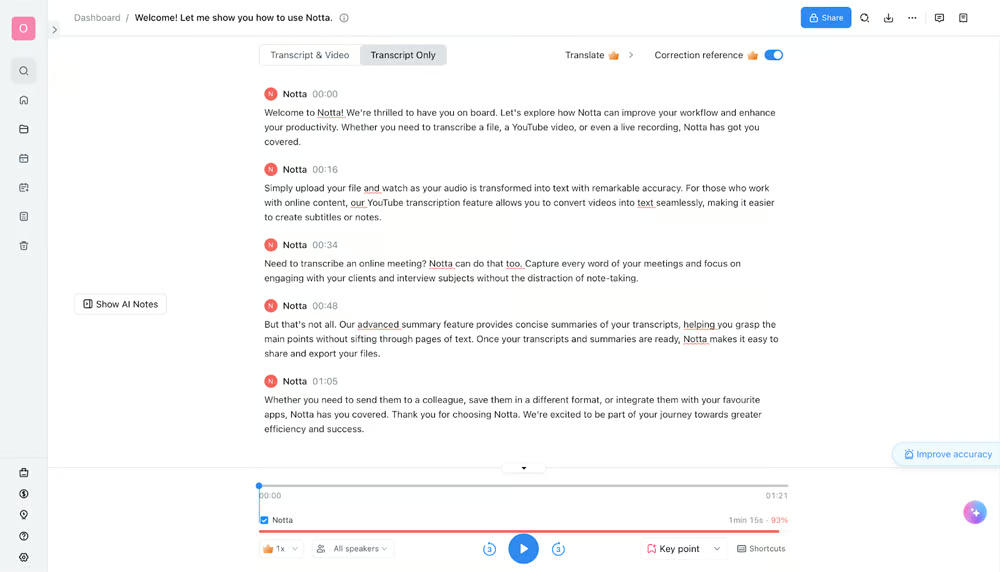
Notta converts audio into text with high accuracy whether you speak live or upload a recording.
It supports 58+ languages, so meetings with mixed-language teams become simple to handle.
Why it matters for you
✔ No more manual note-taking
✔ Saves hours reviewing recordings
✔ Works for interviews, classes, webinars, podcasts, etc.
🗣️ 2️⃣ Speaker Identification & Smart Formatting
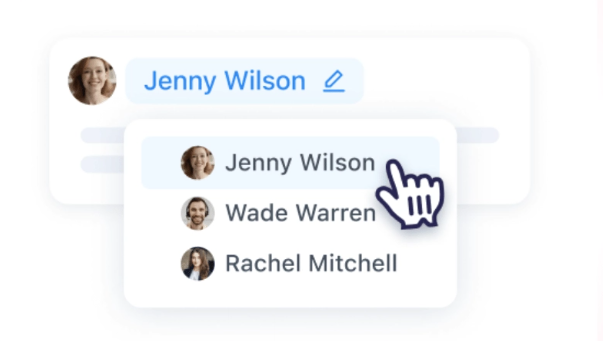
Notta automatically detects who is speaking and separates their dialogue clearly.
Example output:
- Sarah: Budget finalized
- John: Design mockups ready
Why it’s a big deal
✔ No messy transcript
✔ Perfect for team meetings & interviews
✔ Everyone’s input is easy to track
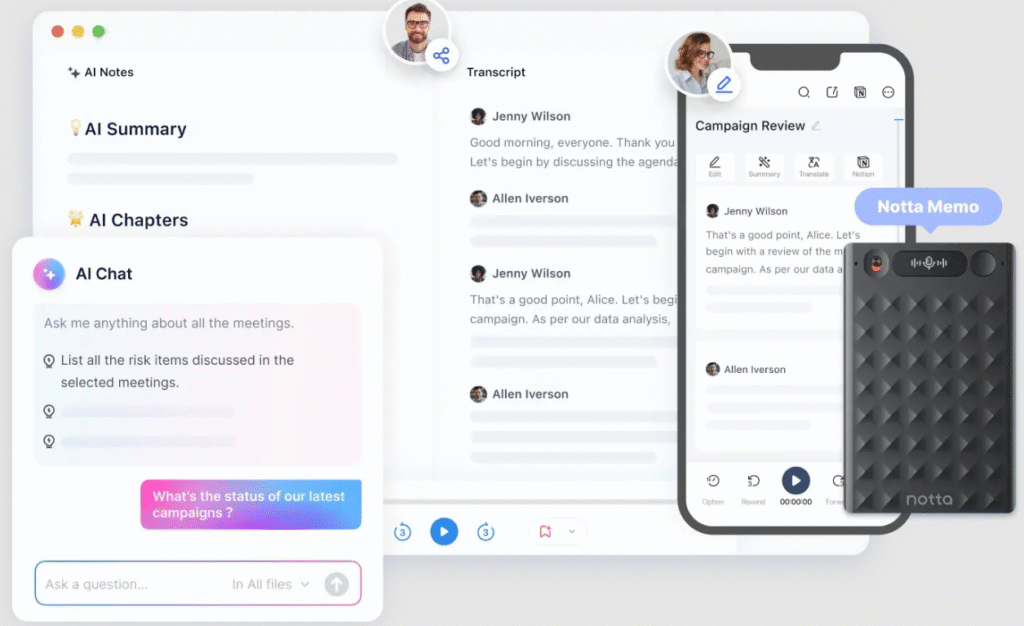
✨ 3️⃣ One-Click Summaries & AI Notes
After the transcript is ready, Notta turns long discussions into:
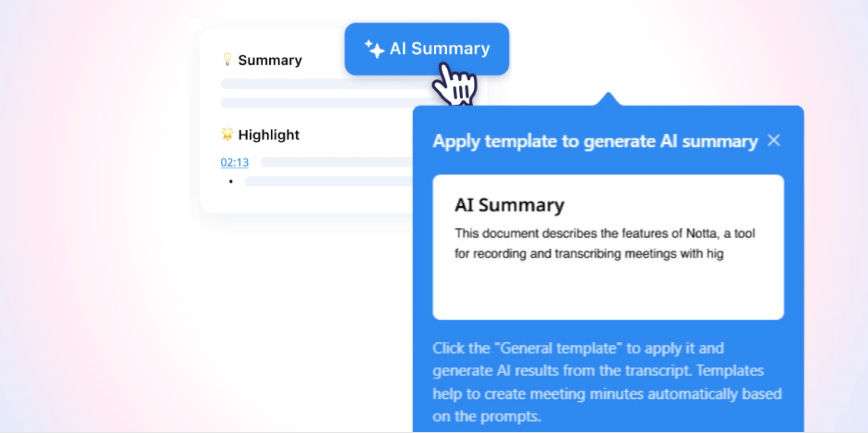
- Action items
- Bullet point highlights
- Quick decision summaries
You also get an AI chatbot to ask questions like:
- “What were the deadlines mentioned?”
Why people love this
✔ 1-hour meeting → 1-minute recap
✔ Helps managers & students get to the point fast
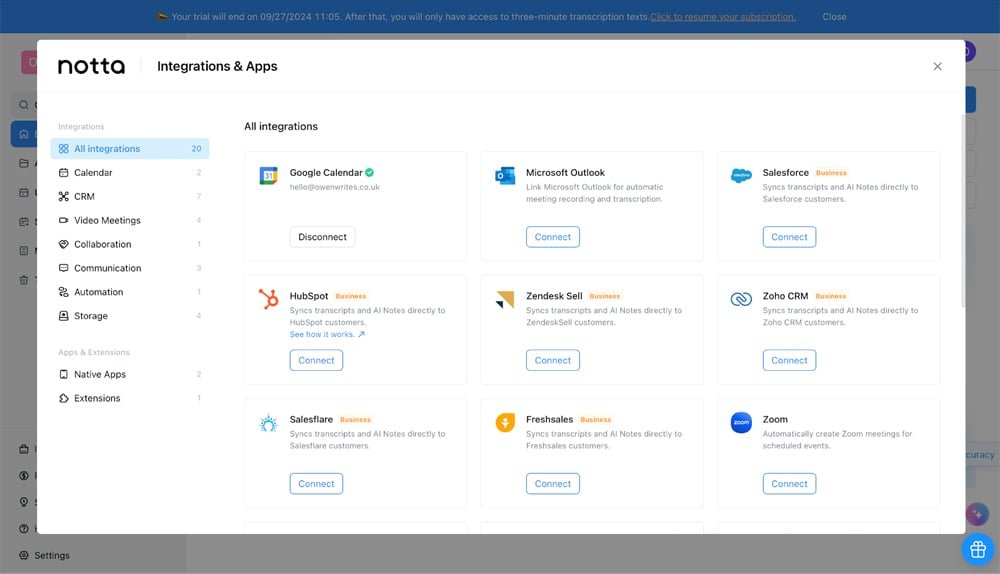
🤖 4️⃣ Notta Bot + Meeting Integrations
Notta Bot can join your meetings automatically and handle everything:
- Record conversation
- Transcribe live
- Share notes right after call
Supports:
✔ Zoom
✔ Google Meet
✔ Microsoft Teams
✔ Google Calendar integration
Why it’s useful
✔ You can focus on talking Notta does the writing
✔ No “Oops… forgot to record” moment
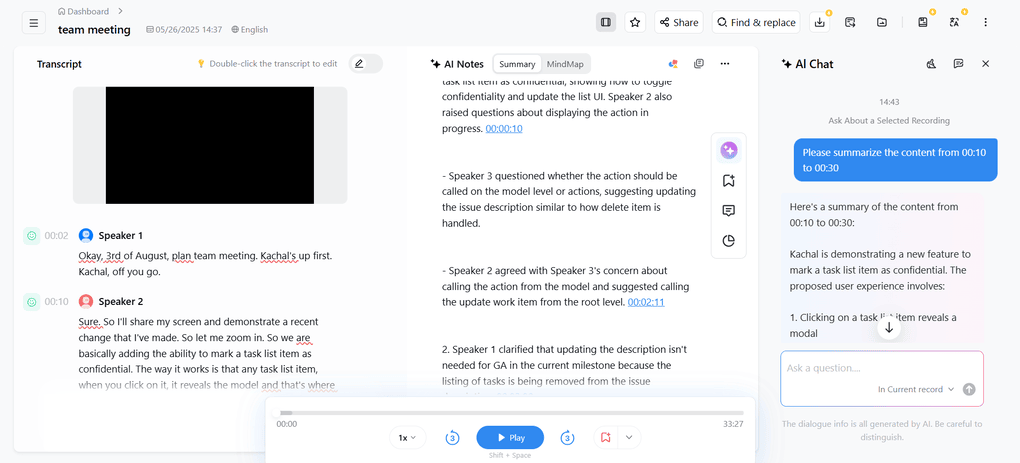
👥 5️⃣ Team Collaboration + CRM Integrations
Multiple teammates can edit, highlight, comment in real time.
It also connects with:
- Salesforce
- HubSpot
- Slack
- Zapier
- Zoho CRM
Why you need this
✔ Smooth workflow for sales, HR, marketing
✔ Meeting notes instantly available in your tools
🌍 6️⃣ Bilingual Transcription + Translation
Notta can record in one language → deliver text in another.
Example:
Spanish audio → English transcript
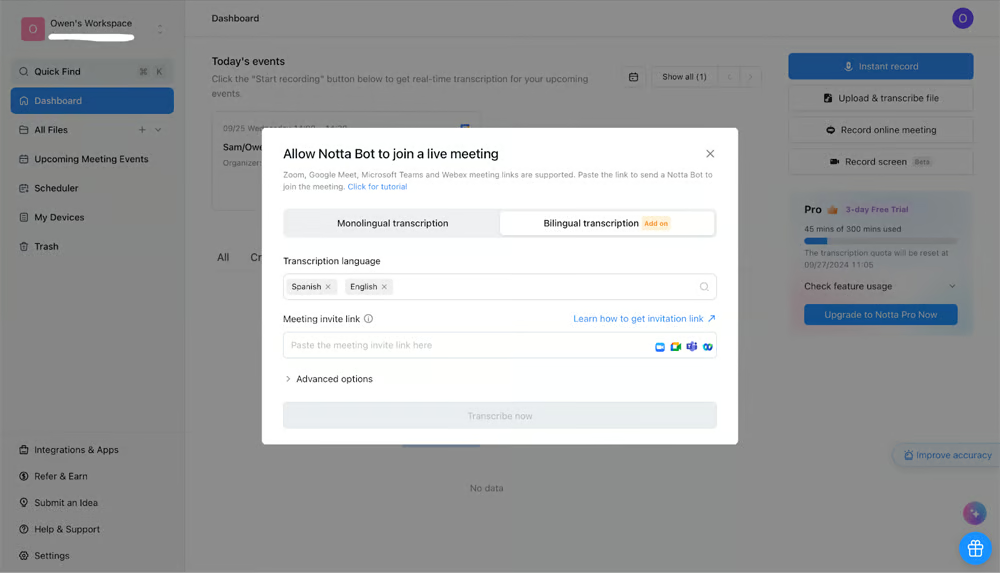
Supports 11 bilingual language combinations.
Best for
✔ Global teams
✔ Training & onboarding
✔ Market research interviews
#4 Notta AI Pricing Plans (2025)
Notta offers four pricing tiers depending on how many meeting minutes you need each month. Here’s a clean breakdown:
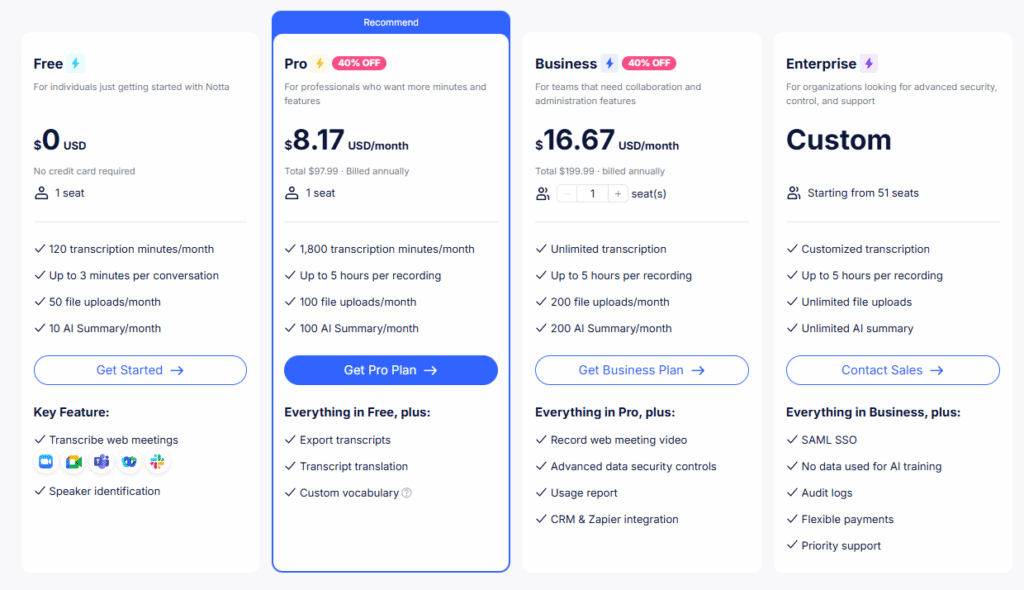
🆓 1️⃣ Free Plan — $0/month
Best for: Students & casual users trying Notta for the first time
Included:
- 120 transcription minutes/month
- Up to 3 minutes per recording
- 50 file uploads/month
- 10 AI summaries/month
- Speaker identification
- Basic web meetings transcription
- Supports Zoom/Meet/Teams/Slack imports
Good for: occasional short meetings or school lectures
Limit: Very restricted recording time (3 mins/session)
⭐ 2️⃣ Pro Plan — $8.17/month (Billed annually)
➡ Best Value for most users ✔ Recommended
Included:
- 1,800 transcription minutes/month
- Up to 5 hours per recording
- 100 file uploads/month
- 100 AI summaries/month
- Export transcripts (DOC, PDF, TXT, SRT)
- Translation + multi-language transcription
- Custom vocabulary (technical terms learned by AI)
Perfect for: content creators, solo professionals, students with long lectures
🏢 3️⃣ Business Plan — $16.67/month per seat (Billed annually)
Best for: Teams + organizations
Everything in Pro, plus:
- Unlimited transcription minutes
- Up to 5 hours per recording
- 200 file uploads/month per seat
- 200 AI summaries/month
- Record web meeting video
- CRM + Zapier integration
- Advanced data security
- Usage reports for admin
Ideal for: sales, support, HR, and remote teams needing shared workspace
🏦 4️⃣ Enterprise — Custom Pricing (51+ Seats)
For large organizations needing advanced control.
Everything in Business, plus:
- SAML SSO
- No data used for AI training
- Audit logs
- Priority support
- Flexible billing options
Best for: corporations with compliance + privacy policies
👉 If you ever want to cancel your Notta subscription, here’s a detailed step-by-step guide: How to Cancel Notta Subscription
#5 Notta AI Pros & Cons
Pros
- ✓ Accurate transcription (90–95% in clean audio)
- ✓ 58+ language support + bilingual transcription
- ✓ AI summaries & action items save review time
- ✓ Speaker identification for multi-speaker meetings
- ✓ Strong integrations (Zoom, Meet, Teams, Salesforce, Slack, Zapier)
- ✓ Notta Bot auto-joins meetings – no manual recording
- ✓ Affordable pricing compared to Otter & Fireflies
- ✓ Works on all devices — Web, iOS, Android, Chrome extension
Cons
- ✕ Free plan limits recordings to 3 minutes each
- ✕ Background noise reduces accuracy slightly
- ✕ CRM + advanced security only in Business/Enterprise
- ✕ AI chatbot depends on transcript quality (may need edits)
#6 Is Notta AI Safe? (Security & Privacy)
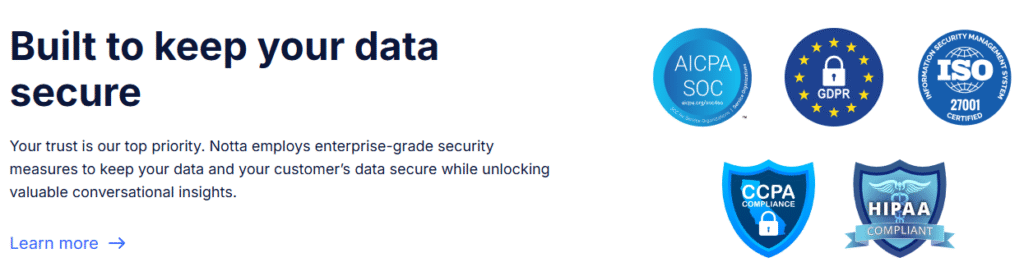
Notta is designed with business-level security, making it safe for professional use not just personal note-taking.
Here’s how it protects your data:
✔ Encrypted Data
All recordings and transcripts are protected with industry-standard encryption, both:
- During transfer
- When stored on servers
This ensures unauthorized users can’t access your information.
✔ Your Data = Your Ownership
Notta clearly states:
Your transcripts belong to you not used to train AI (Business & Enterprise plans)
This is especially important for:
- Corporate meetings
- Legal/HR/sensitive discussions
✔ Access Control & Team Permissions
Admins can:
- Restrict who can view or edit files
- Enable role-based controls
- Track usage with audit logs (Enterprise)
Fits compliance needs in regulated sectors.
✔ Secure Cloud Infrastructure
Notta runs on trusted cloud platforms with monitoring and authentication standards followed by large enterprises.
#7 Who Is Notta AI Best For? Who Should Avoid It?
| Type of User | Why Notta.ai Fits / Doesn’t Fit |
|---|---|
| Students (Good fit) | Want to save time on note-taking by turning lectures into clear notes and summaries. |
| Business teams (Good fit) | Need automatic meeting minutes, action items, and exports to tools like CRM systems. |
| Content creators (Good fit) | Convert videos or podcasts into scripts and written content quickly. |
| Journalists & interviewers (Good fit) | Require fast, searchable transcripts of interviews and spoken content. |
| Sales & support teams (Good fit) | Track key details and follow‑ups from client or customer calls. |
| Global teams (Good fit) | Collaborate using transcription and translation across many languages. |
| Users needing perfect legal/medical accuracy (Not ideal) | Expect 100% accuracy without manual review or edits. |
| Very noisy environments (Not ideal) | Most recordings are low quality, making accurate transcription difficult. |
| Heavy users on free plan (Not ideal) | Need long, frequent meeting transcription but only want to use the free tier. |
| Offline‑only workflows (Not ideal) | Require fully offline transcription with no internet connection. |
| Rarely on calls / recordings (Not ideal) | Do not rely on conversations or spoken content for work or study, so value is limited. |
#8 How to Use Notta AI: Step-by-Step Guide
Here’s a typical workflow for using Notta:
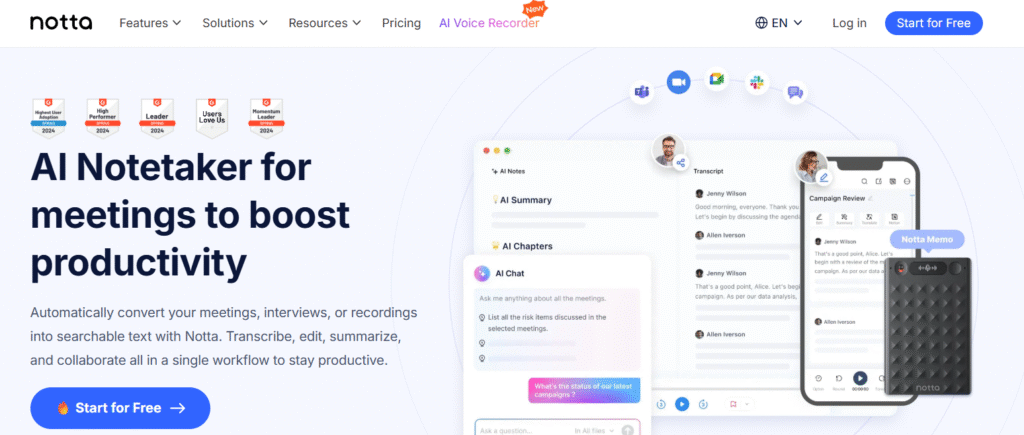
- Sign up — start with free plan to test.
- Choose mode — either:
- Start a live meeting transcription (for a Zoom/Meet call), or
- Upload an audio/video file (MP3, WAV, video) for transcription.
- Let Notta process — it generates transcript (depending on length, a few minutes to complete). In ideal conditions, approximately 1 hour gets transcribed in ~5 minutes.
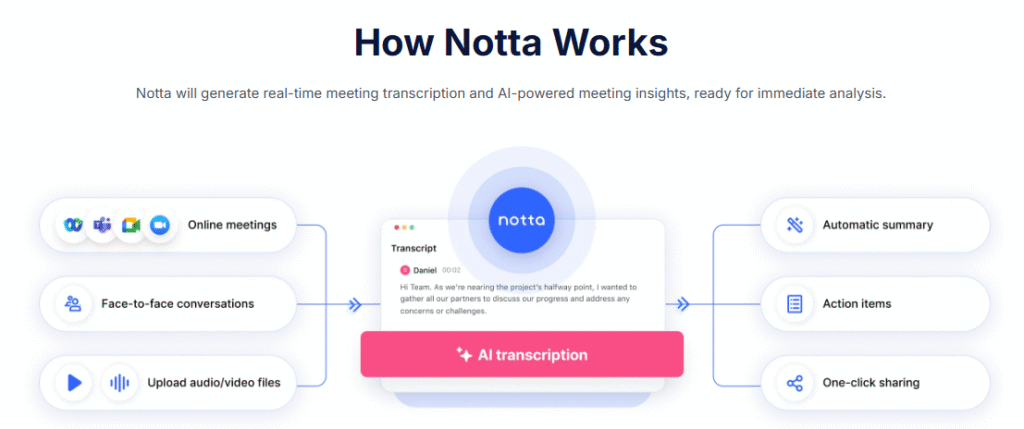
- Review / Edit — correct speaker tags, check for mis-transcribed words (especially in noisy or accented audio).
- Use extra features: generate an AI summary; add custom vocabulary/dictionary (for jargon); translate if needed.
- Export or share — export transcript or summary in desired format (TXT, PDF, SRT, etc.), share link or download.
If you’re doing frequent calls or heavy workload upgrade to Pro or Business plan depending on your usage.
#9 Notta AI vs Competitors: Which One Should You Choose?
Everyone compares Notta with Otter.ai and Fireflies.ai so here’s the clear difference:
📌 Quick Comparison Table
| Feature | Notta AI | Otter.ai | Fireflies.ai |
|---|---|---|---|
| Real-time transcription | ✔ Yes | ✔ Yes | ✔ Yes |
| AI meeting summaries | ✔ Strong | ✔ Basic | ✔ Strong |
| Video recording | ✔ Business plan | ❌ No | ✔ Yes |
| Supported languages | 58+ | Only English-based | 30+ |
| Bilingual transcription | ✔ Yes (11 pairs) | ❌ No | ❌ No |
| Integrations | Zoom, Meet, Teams, CRM, Zapier | Zoom, Meet, Teams | Zoom, Meet, Teams, CRM |
| Meeting bot | ✔ Smart automation | ✔ Available | ✔ Available |
| Mobile apps | iOS + Android | iOS + Android | iOS only (limited) |
| Pricing | Affordable | Expensive | Mid-range |
| Accuracy in accents | High | Medium | Medium |
Start Transcribing in Seconds ✍️
#10 Supported Languages & Platforms
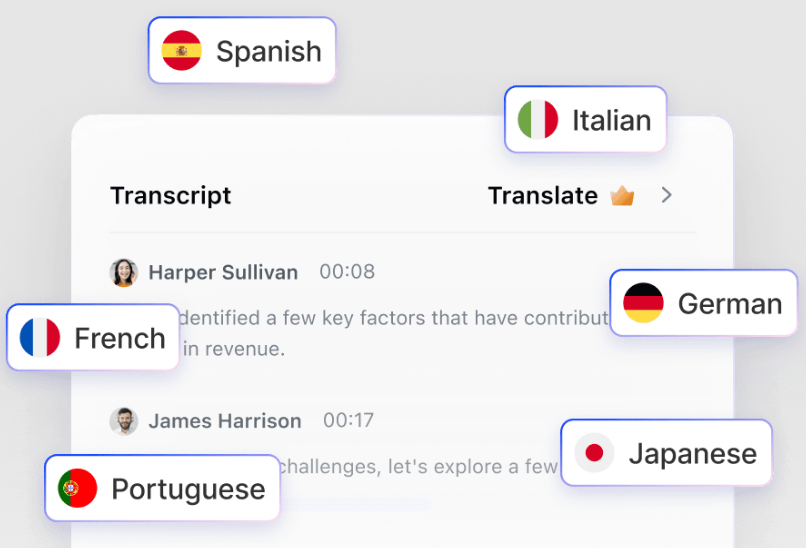
- Notta reportedly supports ~58 languages for transcription.
- It allows real-time transcription, and also letting you upload audio/video files (MP3, WAV, and common formats) for transcription.
- Summaries, speaker labeling, translation so you can both transcribe and translate content across languages.
- Because it’s web-based (and also mobile per app store listing), you can use Notta from desktop or mobile devices.
So whether you record via Zoom, record local files on your phone, or import downloaded media Notta covers most common platforms/formats.
#11 Final Verdict – Should You Use Notta AI?
Yes — if your needs align with what Notta does best: transcribing meetings/podcasts/video quickly, multilingual transcription/translation, needing editable/writable transcripts or summaries, and you’re okay with manually reviewing output when audio isn’t perfect.
Notta delivers impressive convenience and speed and for many use cases (content creation, remote work, multilingual media, note-taking, interviews), it’s a very strong, cost-effective tool.
But if your priority is absolute accuracy, perfect speaker labeling, or heavy enterprise-grade privacy and compliance treat Notta as a “first draft helper,” not a “final-publish output.”
👉 My recommendation: start with the free plan, test it thoroughly (especially with the types of audio you usually handle). If you find the outputs acceptable (or comfortably editable), upgrading to Pro is likely worth it.
RELATED ARTICLES
FAQs
Q: Can I use Notta for free?
Q: How accurate is Notta AI?
A: Notta delivers 90–95% accuracy in clear audio conditions. Accuracy may drop slightly with noise or overlapping speech.
Q: Does Notta work with Zoom, Google Meet, and Microsoft Teams?
Yes. Notta integrates with all major meeting platforms and a bot can join meetings automatically to record and transcribe.
Q: Does Notta identify different speakers?
Yes. Notta includes speaker diarization so each speaker’s text is separated clearly in transcripts.
Q: Is a Chrome extension available?
Yes. You can capture browser audio like webinars or YouTube videos using the Notta Chrome Extension.