
Struggling to manage multiple projects, timelines, and teams?
You’re not alone! We all know how challenging it can be to stay organized without the right tools.
Enter Monday.com not just another task manager, but a highly visual, flexible, and powerful work platform designed to make your workflow smoother and stress-free. 🌟

📌 Why I Chose Monday.com
When I first tried Monday.com, I wasn’t sure if it would be the tool that would finally solve my project management problems. I’ve tried tools like Trello and Asana, which were decent, but something was always missing. However, Monday.com blew me away with its ability to fully customize workflows.
It offers an intuitive platform that helped me organize tasks, teams, and projects with ease. For example, I created a “Content Calendar” board, where I could track deadlines, assign tasks, and easily monitor project status. 📅
Within two weeks, I noticed significant improvements in productivity, and the stress levels dropped. I also scored a great deal with a Monday.com coupon during sign-up something to keep an eye on! 💰
📌 My Personal Experience with Monday.com
When I first tried Monday.com, I didn’t expect much. Having used tools like Trello and Asana, I thought it’d be similar. But Monday.com truly impressed me by simplifying my workflow.
🔹 Customizable Boards: I set up a “Content Calendar” board to track topics, deadlines, and progress everything visual and easy to manage.
🔹 Time-Saving Automations: Automation alerts for overdue tasks and status updates saved us time, reducing the need for follow-up emails.
🔹 Seamless Collaboration: Feedback moved from email to the comment section, making communication quicker and more organized.
After just two weeks, productivity surged, and the stress of missed deadlines faded away. 🌟


📌 The Core Features of Monday.com: What Makes It Stand Out
Monday.com offers a wide range of features that help teams stay organized, collaborate efficiently, and track progress. Let’s break down the core tools that made Monday.com a top choice for me:
📌 1️⃣ Project Management: Streamlining Your Workflow
What it is:
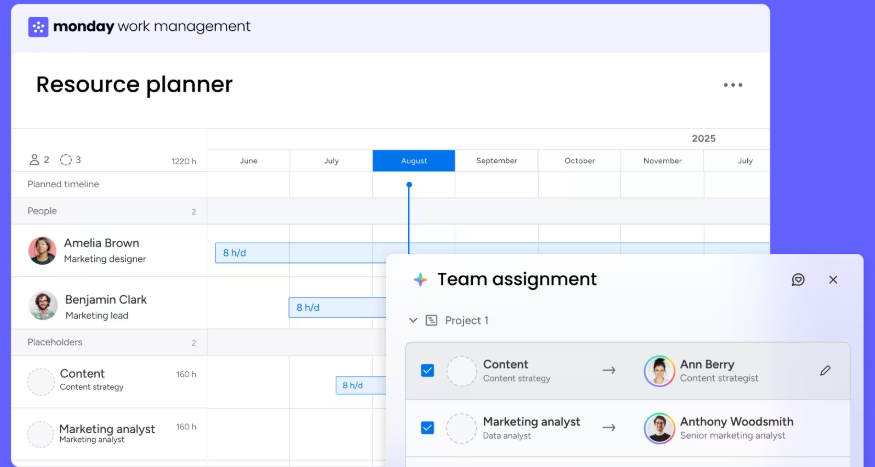
Project management is the core feature of Monday.com, designed to help teams manage tasks, projects, deadlines, and workflows efficiently. It allows you to create boards tailored to specific needs, ensuring that tasks are tracked and completed on time.
Main Features:
- Customizable boards: Create boards for different workflows such as content calendars, project plans, and marketing campaigns.
- Multiple views: Kanban, Calendar, Gantt, Table, and more to visualize your tasks and workflows.
- Dashboards: Track progress across projects, monitor workloads, and visualize data.
- Workflow Automation: Automate repetitive tasks like status updates, reminders, and notifications to save time.
- Time tracking (on certain plans): Track time spent on each task for better resource management.
Pros:
- Highly customizable and visual tailor boards to fit any project or workflow.
- Multiple views ensure your team can work in the way that suits them best.
- Dashboards provide a centralized location to track multiple projects at once.
- Automations cut down on manual effort, making workflows more efficient.
- Scales well from freelancers to large teams.
Cons:
- For smaller projects, the setup might feel like overkill.
- Some features like advanced automations and views are limited to higher-tier plans.
- The pricing can increase as your team grows due to the seat-based pricing model.
Pricing Plan:
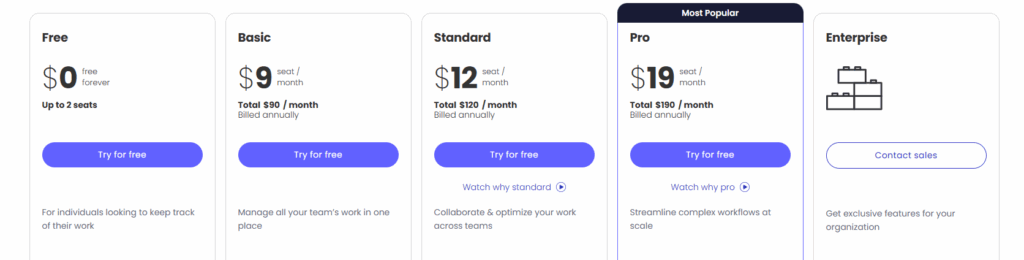
| Plan | Price (Per User/Month) | Total for 10 Seats | Key Features |
|---|---|---|---|
| Basic | $9 | $90/month | Dev templates, unlimited boards |
| Standard | $12 | $120/month | Timeline view, 250 automations |
| Pro | $20 | $200/month | Time tracking, 25k automations |
| Enterprise | Custom | Contact Sales | Security, permissions, full support |
📌 2️⃣ CRM & Sales Pipeline Management: Tracking Leads with Ease
What it is:
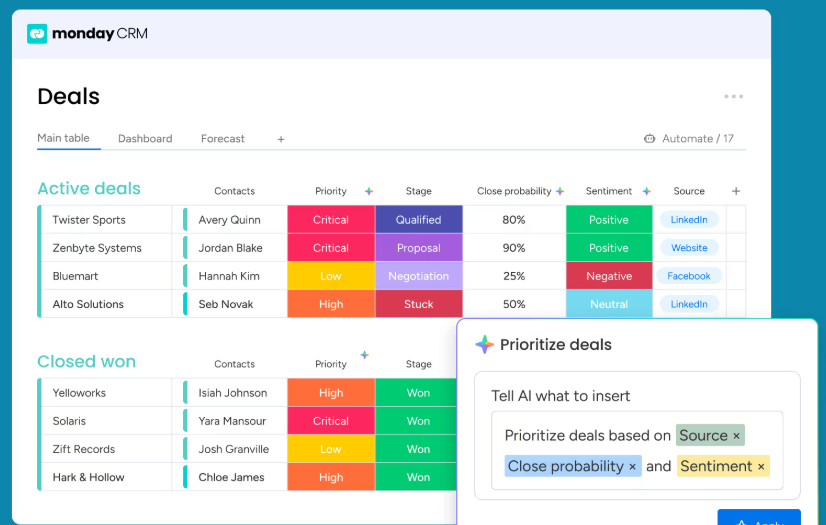
Monday.com isn’t just for project management it can also serve as a powerful CRM to track your sales pipeline, leads, and customer interactions. This feature allows sales teams to manage deals and clients while staying organized and on top of their work.
Main Features:
- Custom boards for leads, deals, and contacts with fields for deal size, next action, status, and more.
- Pipeline visualization: Use Kanban or other views to track deals as they move through stages (e.g., New → Contacted → Negotiation → Closed).
- Automations to trigger reminders for follow-ups, status changes, and deal updates.
- Integrations with email and other tools for seamless communication and collaboration.
- Collaboration tools: Teams can assign tasks, attach files, and track activities on each deal.
Pros:
- Centralized system: Keep all sales tasks, notes, and deals in one place no need for separate CRM tools. 📊
- Highly flexible: You can customize pipelines to match your sales process, making it work for any business. 🔄
- Visibility: Everyone can see where a lead stands and who’s working on it, improving transparency. 👀
Cons:
- Not as advanced as dedicated CRMs: While functional, it lacks some specialized features found in tools like Salesforce. 🧐
- Scalability limits: Larger teams or complex pipelines may hit limitations without extra customization. ⛔
- Price increases: As you add more sales reps, the seat-based pricing quickly adds up. 💸
Pricing:
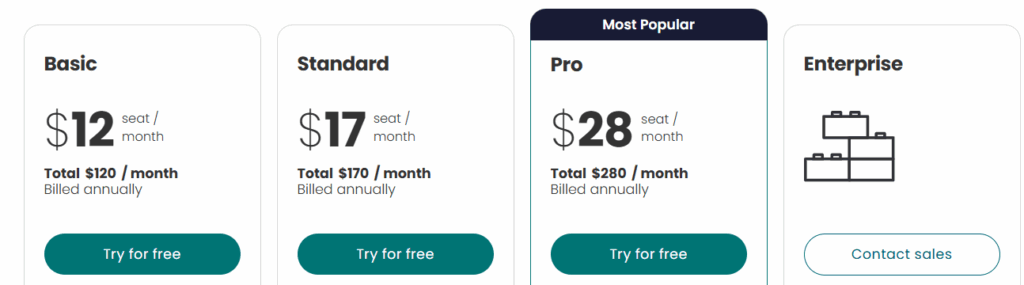
| Plan | Price (Per User/Month) | Total for 10 Seats | Key Features |
|---|---|---|---|
| Basic | $12 | $120/month | Unlimited contacts, pipelines, lead tracking |
| Standard | $17 | $170/month | Email sync, quotes/invoices, 250 automations |
| Pro | $28 | $280/month | Forecasting, email templates, 25k automations |
| Enterprise | Custom | Contact Sales | Advanced permissions, analytics, governance |
📌 3️⃣ Dev & Bug-Tracking: Streamlining Software Development
What it is:
For development teams, Monday.com can double as a Dev workflow tool for tracking bugs, managing sprints, and overseeing product workflows. Whether you’re tracking tasks, bugs, or releases, this tool keeps everything organized in one place.
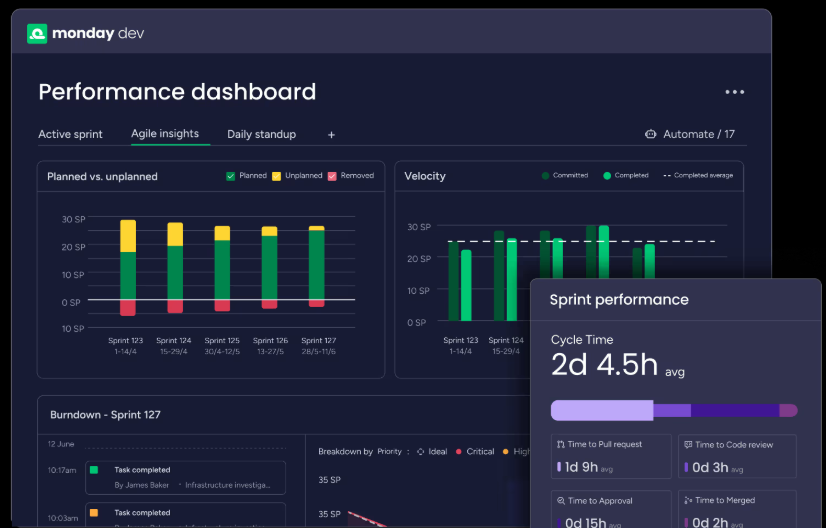
Main Features:
- Boards for backlog, to-do, in-progress, and done: Organize your dev tasks just like a Kanban or Scrum board.
- Task/item custom fields: Use priority, due dates, assignees, and tags to track bug fixes, feature requests, and improvements. 🔧
- Multiple views: Switch between Kanban, Timeline, or Gantt views to plan sprints or release schedules.
- Automations & integrations: Set up notifications for task changes and integrate with tools like version control and Slack. ⚙️
- Dashboards: Track bug counts, release progress, and team workload, making it easier to monitor the dev pipeline. 📊
Pros:
- Clarity in dev workflows: Everyone can see tasks, bugs, and priorities, improving team coordination. 👥
- Flexible methodologies: Supports Scrum, Kanban, and hybrid approaches, making it adaptable to your dev process. 🔄
- Cross-functional collaboration: Developers, QA, product teams, and designers can all collaborate on the same board. 🖥️
Cons:
- Not as specialized as dev-specific tools: Lacks advanced features like version control integration or code review capabilities. ⚠️
- Can get messy with large projects: Without a disciplined setup, boards can become cluttered. 🧩
- Requires higher plans for advanced features: Some views and automations are restricted to paid plans. 💡
Pricing:
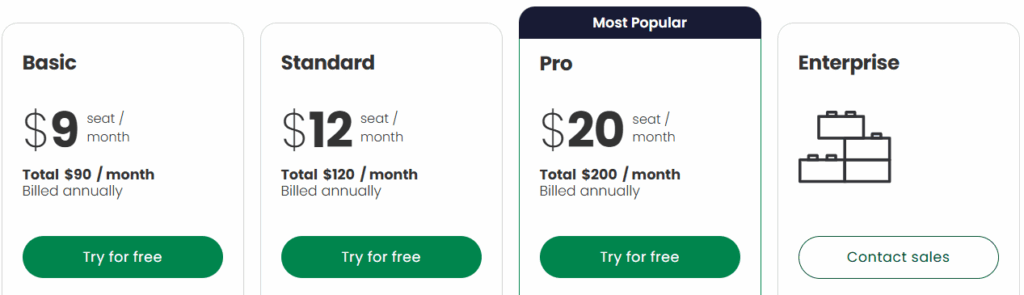
| Plan | Price (Per User/Month) | Total for 10 Seats | Key Features |
|---|---|---|---|
| Free | $0 | Free (Up to 2 users) | 3 boards, 8 column types, mobile app |
| Basic | $9 | $90/month | Unlimited boards, 5GB storage, 1‑week log |
| Standard | $12 | $120/month | Timeline view, guest access, 250 automations |
| Pro | $19 | $190/month | Time tracking, private boards, 25k automations |
| Enterprise | Custom | Contact Sales | Advanced security, analytics, support |
📌 4️⃣ Collaboration & Workflow Automation: Teamwork Made Easy
What it is:
Monday.com’s collaboration and workflow automation features help teams stay connected, organized, and efficient. It’s the “glue” that binds your team’s efforts together across various projects, ensuring smoother workflows and less manual effort.
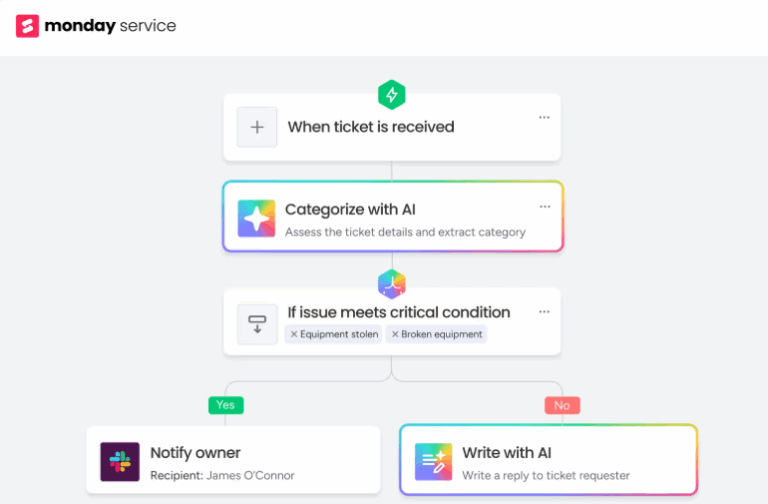
Main Features:
- Comments & updates: Add comments and file attachments to each task to centralize all communication. 💬
- Integrations: Connect with tools like Gmail, Slack, Google Drive, Zoom, and more, bringing all your communication into one space. 🔗
- Workflow automation: Automate repetitive tasks like status changes, reminders, and recurring tasks to save time. ⏰
- Shared docs & knowledge base: Some plans offer a shared space to keep documents and project specs in one place, providing easy access to the team. 📂
- Unified dashboards: Track work progress, deadlines, and workloads across all boards for better transparency. 📊
Pros:
- Reduces email dependency: Everything related to a task stays within Monday.com, streamlining communication. 📧
- Saves time: Automations handle routine tasks, reducing manual work and human error. 🕒
- Team accountability: Everyone knows their tasks and deadlines, which improves responsibility and collaboration. 👥
- Great for remote teams: Provides visibility and transparency across teams, even if they’re spread out globally. 🌍
Cons:
- Notification overload: Too many alerts and automations can lead to distractions if not managed properly. 📲
- Can get cluttered: Without discipline, boards and tasks can become disorganized, especially with larger teams. 📋
- Paid plans unlock full features: Some collaboration features, like advanced automations and integrations, are limited on lower-tier plans. 💡
Pricing:
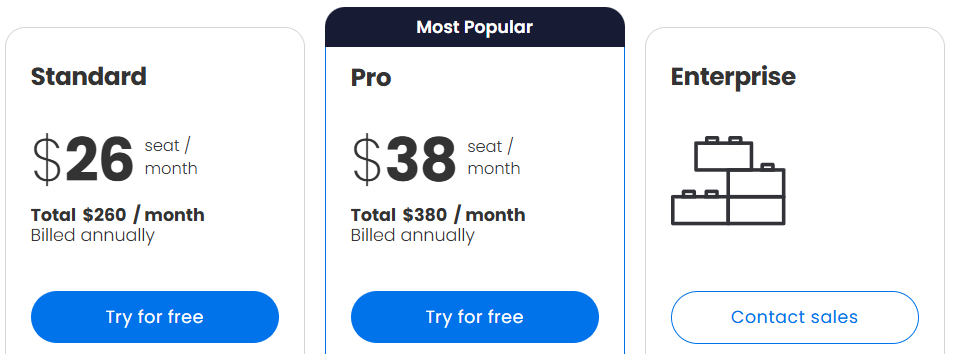
| Plan | Price (Per User/Month) | Total for 10 Seats | Key Features |
|---|---|---|---|
| Standard | $26 | $260/month | Email tickets, workflows, 250 automations |
| Pro | $38 | $380/month | Auto‑responses, 25k automations |
| Enterprise | Custom | Contact Sales | Advanced security, 50‑board dashboards |
📌 Monday.com Pros & Cons: The Truth About Its Strengths & Weaknesses
After using Monday.com extensively, here’s an honest breakdown of what works and where it could improve:
| ✅ Pros | ❌ Cons |
|---|---|
| User-Friendly Interface: Monday.com is incredibly easy to use. The interface is clean and intuitive, which means you don’t need a lot of time to learn how to use it. 👍 | Overwhelming for Small Projects: If you’re working on a small project with minimal team members, Monday.com’s features might feel like overkill. 🧩 |
| Highly Customizable: Whether you’re managing a content calendar, sales pipeline, or development tasks, Monday.com allows you to tailor boards and workflows to your exact needs. 🛠️ | Pricing Can Get Expensive: As your team grows, the cost can add up due to the seat-based pricing model. 💸 |
| Visual Planning: The multiple views (Kanban, Gantt, Timeline, etc.) let teams visualize their work the way they want, improving clarity and efficiency. 📊 | Mobile App Limitations: While the desktop experience is top-notch, the mobile app lacks some features and can be buggy at times. 📱 |
| Powerful Automation: Repetitive tasks like status updates, reminders, and notifications can be automated, saving time and reducing manual effort. 🔄 | Feature Overload: For some users, the vast number of features and customization options can feel overwhelming and complicated, especially for newcomers. 🌀 |
| Great for Collaboration: With task comments, file sharing, and mentions, team members can easily communicate and collaborate in one place. 💬 | Limited Offline Options: Many features require an internet connection to function properly, which could be a drawback for teams working in low-connectivity areas. 🌐 |
| Wide Range of Integrations: Monday.com integrates seamlessly with popular tools like Slack, Google Drive, Zoom, and more, bringing all your tools into one platform. 🔗 | Scalable for Teams: Whether you’re a freelancer or part of a large enterprise, Monday.com scales to fit your team size and workflow needs. 📈 |
📌 Monday.com Use Cases by Industry: How Different Teams Make the Most of It
Monday.com is incredibly versatile and works for a variety of industries. Here’s how different teams can make the most out of it:
🧑💻 Marketing Teams:
Marketing teams love using Monday.com to manage content calendars, campaign tracking, and performance monitoring. With templates like Campaign Tracker and Content Planner, they can easily plan and visualize their marketing strategies. 📅
💼 Sales Teams:
Sales teams use Monday.com as a CRM tool to manage leads, sales progress, and client relationships. Custom boards help track deals through every stage, while automations remind reps of follow-ups, ensuring no lead is forgotten. 🔄
👥 HR Departments:
HR teams use Monday.com for everything from recruitment workflows to onboarding processes and leave approvals. It’s a one-stop solution to track employee tasks and processes without relying on spreadsheets. 👩💼

🖥️ IT Teams:
Monday.com helps IT teams manage support tickets, bug tracking, and software updates. It’s a collaborative space where devs, QA, and product teams can work together, keeping everything aligned. 🔧
🚚 Logistics & Operations Teams:
For teams in logistics and operations, Monday.com is perfect for dispatch planning, delivery tracking, and warehouse coordination. It helps manage workflows and timelines, ensuring smoother operations. 📦
📌 Real User Reviews: What Others Say About Monday.com ⭐️
⭐️ Ratings
- G2: 4.7/5 — praised for its intuitive interface and visual organization.
- GetApp & Capterra: 4.6/5 — users love its task management and ease of use.
👍 Common Praise
- “Made teamwork smoother and more transparent.”
- “Very easy to use once you learn the basics.”
- “Keeps everything in one place, reducing confusion.”
👎 Common Complaints
- “Learning curve can be steep.”
- “Mobile app is limited.”
- “Boards can get crowded with large projects.”

Overall, users find Monday.com flexible and intuitive but note that it can take time to master.
📌 Real-Life Case Study: How We Used Monday.com
When I first started using Monday.com, my goal was simple: organize my marketing team’s weekly tasks and eliminate the chaos of spreadsheets and constant email threads. Here’s what I did:
Step 1: Setting Up the “Weekly Task Planner” Board
I created a board with columns for task name, deadline, assigned to, and status. This gave everyone clear visibility into what needed to be done and by when.
Step 2: Automating Alerts
I set up automations to notify me when tasks were overdue, so no task would slip through the cracks. This saved me from chasing people down for updates.
Step 3: Collaborating in Real-Time
Instead of endless email threads, we used Monday.com’s comment section for feedback and updates. This kept everything in one place and made collaboration seamless.
The Results
- 40% fewer meetings: With everything visible on the board, we didn’t need constant check-ins.
- Zero micromanagement: Tasks were clear, and deadlines were met without pushing for updates.
- Increased productivity: The team felt more in control, and stress levels dropped.

📌 Performance Impact: What Improved After Using Monday.com
Before switching to Monday.com, our team was juggling multiple tools WhatsApp for updates, Excel for task tracking, and email for communication. This led to missed deadlines and confusion. But after implementing Monday.com, here’s what changed:
Key Improvements:
- Task Completion Increased by 25%: With clearly defined tasks, deadlines, and responsibilities, everyone knew what was expected, leading to better execution. 📈
- Fewer Delays: Automated status updates, task reminders, and notifications helped us stay on top of deadlines and reduce delays, ensuring tasks were completed on time. ⏰

- Cut 40% of Internal Meetings: With everything visible on the dashboard, we no longer needed daily check-ins, reducing meeting time and improving productivity. 🕒
- Better Accountability: Transparency around task assignments and progress helped team members stay accountable. No more confusion about who was working on what! ✅
In short, Monday.com transformed our operations by providing clarity, structure, and the ability to monitor progress effortlessly. This led to time-saving, reduced stress, and more efficient teamwork.
📌 Top Monday.com Alternatives: How It Compares to the Competition
While Monday.com is a great tool, it’s important to consider your specific needs. Here are some popular alternatives, each catering to different types of teams and workflows:
1️⃣ ClickUp
- Best For: Teams that need a feature-packed tool with a variety of customization options.
- Strength: ClickUp offers tons of features, even on the free plan. From time tracking to document management, it covers nearly every aspect of project management.
- Weakness: It can be overwhelming and cluttered due to its extensive feature set. Not everyone needs all the functionality it offers.

2️⃣ Asana
- Best For: Teams that prefer a structured approach to task management with clear timelines.
- Strength: Asana excels in task tracking, with great timeline views and an easy-to-follow structure.
- Weakness: Limited customization options on lower plans and lacks advanced automation features compared to Monday.com.
3️⃣ Trello
- Best For: Small teams or those who prefer a simple, Kanban-style project management tool.
- Strength: Trello is incredibly user-friendly and perfect for teams that want an easy-to-use, visual approach to task management.
- Weakness: It lacks the advanced features needed for scaling complex projects, making it less suitable for larger teams.
4️⃣ Wrike
- Best For: Teams that require strong reporting and time tracking features.
- Strength: Wrike offers powerful reporting tools and integrates well with many enterprise software solutions.
- Weakness: The interface can feel rigid, and it’s not as customizable as Monday.com.
Which One Should You Choose?
- Choose Monday.com if you want a visual and flexible tool that works for any department and is easy to use.
- Choose ClickUp if you need a feature-rich platform and don’t mind complexity.
- Choose Asana if you prefer a more structured, timeline-based task management tool.
- Choose Trello if you need simplicity and a basic task board for small teams.

📌 Final Thoughts: Should You Try Monday.com?
After using Monday.com for several months, here’s my conclusion:
Why It’s Worth Trying:
- Visual Workflows: Monday.com’s intuitive, visual boards make it easy to understand and manage work, even for larger teams. 📊
- Automation: Automating routine tasks (like reminders and status updates) can save valuable time. ⏰
- Collaboration: Centralized communication through task comments and file sharing streamlines team coordination. 💬
- Scalable: Whether you’re a freelancer or part of a large enterprise, Monday.com adapts to your needs. 📈
Who Will Love It:
- Small to Mid-Size Teams: Teams who need a flexible tool to manage multiple workflows will love the simplicity and functionality.
- Agencies & Project Managers: The tool is great for managing client projects, teams, and deadlines in one place.
- Remote Teams: The ability to work collaboratively in real-time makes it perfect for remote teams. 🌍
Who Might Skip It:
- Solo Users: If you just need a simple to-do list, Monday.com might feel like overkill.
- Budget-Conscious Teams: Pricing scales up quickly with more users, so it might not be the best fit for teams on a tight budget. 💸

Overall, Monday.com is a powerful, flexible tool for teams of all sizes. If you need a way to streamline your workflows, improve team collaboration, and save time on manual tasks, it’s worth giving it a try. 🚀
FAQs
❓ 1. Can Monday.com integrate with other tools?
Yes, Monday.com integrates with popular tools like Slack, Google Drive, Zoom, Microsoft Teams, and many more, allowing seamless collaboration and data sharing across platforms. 🔗
❓ 2. Is Monday.com suitable for remote teams?
Absolutely! Monday.com is perfect for remote teams, as it allows real-time collaboration, task tracking, and clear visibility for all members, regardless of location. 🌍
❓ 3. Does Monday.com have a free plan?
Yes, Monday.com offers a free plan for up to 2 users, which includes 3 boards and basic features like task management and collaboration. 📋
❓ 4. How secure is Monday.com?
Monday.com follows strong security protocols, including two-factor authentication, encryption, and regular security updates to ensure your data remains safe. 🔐
❓ 5. Can Monday.com be used for personal tasks?
While Monday.com is designed for team collaboration, it can certainly be used for personal task management. You can customize boards to track personal projects and deadlines. 📅